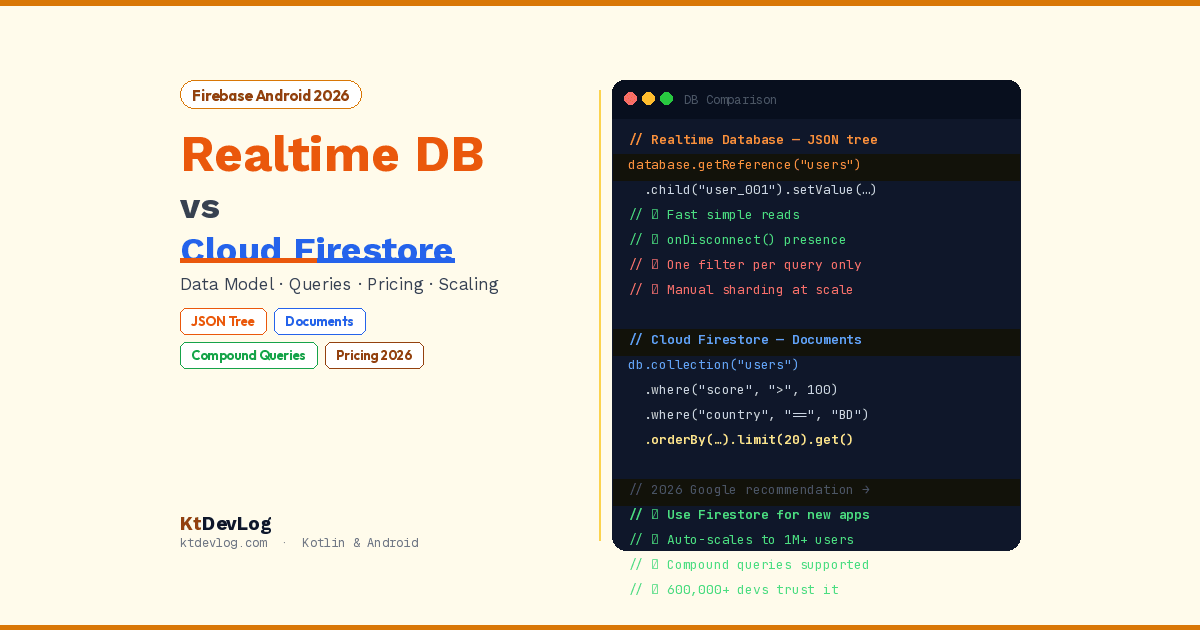

You’re starting a new Android app. You want a cloud database. You open the Firebase Console, click “Build,” and see two options staring back at you: Realtime Database and Cloud Firestore.
Both are from Google. Both are NoSQL. Both sync data in real time. Both work with Kotlin and Jetpack Compose. So which one do you pick?
This is one of the most common questions Firebase beginners ask — and it’s one that doesn’t have a bad answer, only better and worse fits. The Firebase Realtime Database vs Firestore debate has a clear winner for most Android developers in 2026, but understanding why is what helps you make the right choice for your specific project.

Table of Contents
The Short Answer First
If you’re starting a new project in 2026 and you don’t know which to pick, pick Cloud Firestore.
According to the official Firebase documentation, updated April 2026, Google explicitly recommends that new customers start with Cloud Firestore. It has a better data model, richer querying, automatic scaling, and broader offline support. The Realtime Database is still actively maintained and has specific use cases where it outperforms Firestore — but for the vast majority of Android apps beginners build, Firestore is the right starting point.
Now let’s understand why — and when Realtime Database is actually the better choice.
What They Are — The Origin Story
Firebase Realtime Database is Firebase’s original database, launched in 2012. It was revolutionary at the time — a cloud database that synced data across all connected clients in real time, with a simple SDK and no backend code required. Thousands of apps still run on it today.
Cloud Firestore launched in 2017 as Firebase’s second-generation database — designed with the lessons learned from the Realtime Database. It wasn’t a patch or an update. It was a complete rethink of the data model, the query system, the scaling architecture, and the security model.
Understanding this origin helps explain the differences. The Realtime Database wasn’t designed wrong — it was designed for a different era of mobile apps. Firestore was designed knowing what those apps would eventually need to become.
The Data Model — JSON Tree vs Documents and Collections
This is the most fundamental difference. Everything else flows from it.
Realtime Database — One Big JSON Tree
The Realtime Database stores all your data as a single, giant JSON tree. Every piece of data is a node in that tree:
{
  "users": {
    "user_001": {
      "name": "Sharif",
      "email": "sharif@ktdevlog.com",
      "posts": {
        "post_a": { "title": "Kotlin Basics", "likes": 42 },
        "post_b": { "title": "Compose Tips",  "likes": 18 }
      }
    },
    "user_002": {
      "name": "Ahmed",
      "email": "ahmed@example.com",
      "posts": {
        "post_c": { "title": "Room Database", "likes": 91 }
      }
    }
  }
}This works beautifully for simple data. It’s easy to visualise, easy to navigate, and deeply intuitive if you’ve ever worked with JSON. The Realtime Database SDK in Kotlin is minimal and direct:
// Realtime Database — Kotlin
val database = Firebase.database
val usersRef = database.getReference("users")

// Write data
usersRef.child("user_001").setValue(
    mapOf(
        "name"  to "Sharif",
        "email" to "sharif@ktdevlog.com"
    )
)

// Read data once
usersRef.child("user_001").get()
    .addOnSuccessListener { snapshot ->
        val name = snapshot.child("name").getValue(String::class.java)
        println("User: $name")
    }

// Listen for real-time changes
usersRef.addValueEventListener(object : ValueEventListener {
    override fun onDataChange(snapshot: DataSnapshot) {
        for (userSnapshot in snapshot.children) {
            val name = userSnapshot.child("name").getValue(String::class.java)
            println("$name")
        }
    }
    override fun onCancelled(error: DatabaseError) {
        println("Error: ${error.message}")
    }
})The problem with the JSON tree at scale: Queries always return the entire subtree at the queried node. If you query /users, you get every user’s complete data — including their posts, their preferences, and everything nested inside. There’s no way to say “give me just the user names, not the posts.” This causes over-fetching as your app grows.
Cloud Firestore — Documents and Collections
Firestore organises data as documents inside collections. A document is a set of fields. Documents can contain subcollections, which contain more documents:
users (collection)
├── user_001 (document)
│   ├── name: "Sharif"
│   ├── email: "sharif@ktdevlog.com"
│   └── posts (subcollection)
│       ├── post_a (document)
│       │   ├── title: "Kotlin Basics"
│       │   └── likes: 42
│       └── post_b (document)
│           ├── title: "Compose Tips"
│           └── likes: 18
└── user_002 (document)
    ├── name: "Ahmed"
    └── email: "ahmed@example.com"
Querying in Firestore is precise. Reading users/user_001 returns only that document’s fields — not the subcollection. Subcollections are separate reads. This is exactly the controlled, predictable data access that large-scale apps need.
The Kotlin SDK uses data classes and coroutines cleanly, as covered in the Firestore CRUD operations guide:
// Firestore — Kotlin
val db = FirebaseFirestore.getInstance()

// Write a document
db.collection("users").document("user_001")
    .set(mapOf("name" to "Sharif", "email" to "sharif@ktdevlog.com"))
    .await()

// Read a document — returns only that document's fields
val snapshot = db.collection("users").document("user_001").get().await()
val name = snapshot.getString("name")

// Real-time listener
db.collection("users")
    .addSnapshotListener { snapshots, error ->
        val users = snapshots?.toObjects<User>() ?: emptyList()
        // Update UI with users
}Querying — The Biggest Practical Difference
If you remember nothing else from this comparison, remember this: Firestore’s query system is dramatically more powerful than the Realtime Database’s.
Realtime Database Queries
The Realtime Database supports one filter condition and one sort order per query. That’s it.
// Get all users where score > 100 — works fine
usersRef.orderByChild("score").startAt(100.0).get()

// Get all users where score > 100 AND country = "BD" — NOT POSSIBLE
// The Realtime Database cannot combine filter + filter in one query
// You'd have to fetch all users with score > 100 and filter by country client-sideFor apps with simple, predictable access patterns — a chat app reading the last 50 messages, a leaderboard showing top 10 scores — the Realtime Database’s single-condition queries are perfectly adequate.
For apps with complex filtering needs — an e-commerce app filtering products by category AND price range AND rating — you’ll hit the Realtime Database’s query wall immediately.
Firestore Queries
Firestore supports compound queries with multiple where() clauses, sorting by multiple fields, and collection group queries:
// Filter by multiple conditions — fully supported in Firestore
db.collection("products")
    .where(Filter.and(
        Filter.equalTo("category", "books"),
        Filter.greaterThan("price", 10.0),
        Filter.lessThan("price", 50.0),
        Filter.equalTo("inStock", true)
    ))
    .orderBy("rating", Query.Direction.DESCENDING)
    .limit(20)
    .get()
    .await()

// Collection group query — query across ALL posts subcollections
db.collectionGroup("posts")
    .where(Filter.equalTo("published", true))
    .orderBy("createdAt", Query.Direction.DESCENDING)
    .get()
.await()One important Firestore caveat: complex queries require composite indexes, which you define in the Firebase Console. If you run a query that needs a composite index and it doesn’t exist, Firebase throws an error — but helpfully includes a direct link in the error message to create the required index with one click.
Scaling and Performance
| Metric | Realtime Database | Cloud Firestore |
|---|---|---|
| Max concurrent connections | 200,000 per database | 1,000,000+ per project |
| Max write throughput | 1,000 writes/second per database | 10,000+ writes/second per collection |
| Scaling model | Manual sharding for high traffic | Automatic |
| Multiple database instances | ✅ Yes — you can create more | ❌ No — one database per project |
| Data size per node/document | 10MB per node | 1MB per document |
The Realtime Database’s 200,000 concurrent connection limit sounds large — and it is for most small to medium apps. But as your app grows, you’d need to manually shard data across multiple Realtime Database instances — a complex engineering task that Firestore handles automatically.
Firestore’s automatic scaling is one of its biggest architectural advantages. You never think about sharding, connection limits, or provisioning. Firebase scales Firestore for you as your app grows.
Pricing — The Critical Difference in 2026
This is where many developers get surprised, and it’s worth understanding deeply before choosing.
Realtime Database Pricing
Charged by:
- Storage: amount of data stored
- Bandwidth: data transferred in/out
The Realtime Database is cheap for apps that read and write frequently but store modest amounts of data. A chat app that exchanges thousands of messages a day pays mostly for bandwidth.
Free tier (Spark plan): 1GB storage, 10GB/month bandwidth.
Firestore Pricing
Charged by:
- Reads: $0.06 per 100,000 document reads
- Writes: $0.18 per 100,000 document writes
- Deletes: $0.02 per 100,000 deletes
- Storage: $0.18/GB/month
Free tier (Spark plan): 50,000 reads/day, 20,000 writes/day, 20,000 deletes/day, 1GB storage.
The pricing trap to avoid with Firestore: real-time listeners on large collections can accumulate reads extremely fast. If you attach a listener to a collection with 10,000 documents, the initial load costs 10,000 reads. Every document change triggers another read for each connected client. Poorly designed listeners on active apps can burn through the free tier in hours.
How to control Firestore costs:
- Use
limit()on all queries — never listen to unbounded collections - Use field masks —
select("name", "email")— to avoid reading full documents when you only need a few fields - Design data structures that minimise reads — store summary data (last message preview) in parent documents so list screens don’t need to read subcollections
- Set daily spending limits in Google Cloud Console
For most beginner and intermediate apps, both databases stay comfortably within the free tier. Pricing becomes a real concern at scale.
Offline Support
Both databases cache data locally so your app works offline. But there’s an important difference:
Realtime Database: offline support for Android and iOS only. Web clients don’t get offline persistence.
Firestore: offline support for Android, iOS, and web clients. Firestore’s offline cache is also smarter — it stores the results of queries you’ve run, not just raw documents. When you open your app offline, the last query result is immediately available.
For Android-only apps, both are equivalent. If you’re building a cross-platform product where the same database serves web and mobile, Firestore’s broader offline support matters.
Presence Detection — Realtime Database’s Hidden Advantage
Here’s a genuinely useful feature the Realtime Database has that Firestore doesn’t natively support: online presence detection.
// Realtime Database — detect if user is online/offline
val presenceRef = database.getReference("users/user_001/online")
val connectedRef = database.getReference(".info/connected")

connectedRef.addValueEventListener(object : ValueEventListener {
    override fun onDataChange(snapshot: DataSnapshot) {
        val isConnected = snapshot.getValue(Boolean::class.java) ?: false
        if (isConnected) {
            presenceRef.setValue(true)
            // Set to false when user disconnects — runs on Firebase servers
            presenceRef.onDisconnect().setValue(false)
        }
    }
    override fun onCancelled(error: DatabaseError) {}
})onDisconnect() is a Realtime Database feature that queues an operation to run on Firebase’s servers when a client loses connection — even if the app crashes or the network drops unexpectedly. This is how you build “online/offline” indicators in chat apps.
Firestore has no native equivalent. You can approximate it using Firestore + Realtime Database together (a common pattern for apps that need presence) — but using just Firestore, you’d need periodic Firestore writes to track the last-seen timestamp and treat silence as offline.
Side-by-Side Decision Guide
| Your Need | Realtime Database | Cloud Firestore |
|---|---|---|
| Simple data structure, JSON-like | ✅ Natural fit | ✅ Works fine |
| Complex relational-style data | ❌ Painful at scale | ✅ Purpose-built |
| Multi-field compound queries | ❌ Not supported | ✅ Full support |
| Online/offline user presence | ✅ onDisconnect() built-in | ❌ Needs workaround |
| Low-latency simple lookups | ✅ Extremely fast | ✅ Fast |
| Automatic scaling to millions of users | ❌ Requires manual sharding | ✅ Automatic |
| Offline support — web clients | ❌ Mobile only | ✅ Mobile + Web |
| Predictable per-operation pricing | ❌ Bandwidth-based | ✅ Per read/write |
| Google’s 2026 recommendation | ❌ Not recommended for new projects | ✅ Recommended |
Which One for Common App Types
Chat app — Realtime Database or Firestore both work. Realtime Database is slightly simpler for basic 1:1 or group chat. Firestore is better if you also need user profiles, message search, and complex filtering.
Social media feed — Firestore. You need compound queries for filtering posts by user + date + category. The Realtime Database can’t do this without client-side filtering.
E-commerce app — Firestore without question. Product filtering by multiple attributes (category, price range, brand, rating) requires compound queries.
Live game leaderboard — Realtime Database. Low-latency, simple sorted lookups of score fields are exactly what the Realtime Database was designed for.
User profiles with settings — Firestore. Simple document per user, easy to read and update specific fields.
IoT / sensor data — Realtime Database. High-frequency writes of simple numeric values, accessed by time range. Low cost, low latency.
Learning / first Firebase project — Firestore. The data model is more intuitive for beginners coming from object-oriented programming, the Kotlin SDK is cleaner, and Google’s official tutorials and documentation all prioritise Firestore.
Can You Use Both?
Yes — and some apps intentionally do. A common pattern:
- Firestore stores user profiles, posts, products, orders — structured data that needs rich querying
- Realtime Database handles online presence, live typing indicators, cursor positions — features that need
onDisconnect()and millisecond-latency simple reads
Both databases can exist in the same Firebase project. Both can be accessed from the same Android app simultaneously. You pay separately for each.
Frequently Asked Questions
Basics
What is the main difference between Firebase Realtime Database and Cloud Firestore?
The main difference is the data model. Realtime Database stores all data as a single JSON tree and supports only one filter condition per query. Firestore uses a documents-and-collections model with subcollections, supports compound queries with multiple conditions, and scales automatically. Firestore is Google’s recommended database for new projects in 2026 — it’s more powerful, better structured for complex apps, and has broader platform support.
Which Firebase database does Google recommend for new apps in 2026?
Google explicitly recommends Cloud Firestore for new projects. The official Firebase documentation states this directly — Firestore is the recommended enterprise-grade database trusted by over 600,000 developers, while Realtime Database is described as suitable for simpler apps with limited scalability needs.
Choosing the Right Database
Is Firestore more expensive than Realtime Database?
It depends on your app’s usage pattern. Realtime Database charges for bandwidth and storage. Firestore charges per operation (read, write, delete). For apps with many simple reads and writes of small data, Realtime Database can be cheaper. For apps that read large amounts of data infrequently, Firestore can be cheaper. Both have generous free tiers — 50,000 reads and 20,000 writes per day for Firestore, 10GB bandwidth per month for Realtime Database — that cover most beginner and intermediate apps entirely.
Can I use Firebase Realtime Database and Firestore at the same time?
Yes. Both databases can coexist in the same Firebase project and be accessed simultaneously from the same Android app. A common pattern is using Firestore for structured user data and Realtime Database for online presence tracking and low-latency live features. Both use separate dependencies and separate instances in your code.
Does Realtime Database support offline mode?
Yes, but with limitations. Realtime Database supports offline persistence for Android and iOS clients only — web clients don’t get offline support. Cloud Firestore supports offline persistence for Android, iOS, and web clients. For Android-only apps, both databases provide equivalent offline functionality.
Conclusion
For most Android developers asking the Firebase Realtime Database vs Firestore question in 2026, the answer is Firestore. Better querying, automatic scaling, broader offline support, a cleaner Kotlin SDK, and Google’s own recommendation all point in the same direction.
The Realtime Database isn’t obsolete — it’s the right tool for low-latency simple data, online presence detection, and IoT-style high-frequency writes. If your app needs any of those specific capabilities, the Realtime Database earns its place. For everything else, Firestore’s document model handles complexity that the JSON tree cannot.
Choose your database based on your data model first, your query needs second, and your pricing expectations third. Both databases will keep your app fast and your data synced in real time — the question is which one fits the shape of your data and the complexity of your queries.
Once you’ve chosen Firestore, the Firestore CRUD operations guide walks through every read, write, update, and delete operation with complete Kotlin code — everything you need to start building immediately.
Pick the database that fits your data. Then build something that earns it.