
Imagine you’re at a coffee shop. You walk up to the counter, place your order, and then just… stand there. Frozen. Staring at the barista. Not talking to anyone. Not checking your phone. Just waiting until your coffee is ready.
That’s basically what a blocked thread looks like in code.
Now imagine a smarter version — you place your order, grab a number, sit down, chat with a friend, check your messages, and when your coffee is ready, you walk up and grab it. Same result. Way more efficient. That’s the idea behind Kotlin coroutines, and by the end of this guide, you’ll understand exactly why they matter for Android development.



Table of Contents
What Is Concurrency and Why Should You Care?
Concurrency means doing multiple things at the same time — or at least, appearing to. In Android apps, this matters enormously.
Think about it: when your app loads data from the internet, you don’t want the entire screen to freeze while it waits. Users will close your app in three seconds flat. Concurrency is what keeps the UI smooth while background work happens behind the scenes.
For a long time, Java developers solved this with threads. Kotlin developers still can use threads, but they also have something far more powerful: coroutines.
Most beginners hear “coroutines” and panic. Don’t. Once you see the analogy, it clicks immediately.
Understanding Java Threads: The Old-School Approach
A thread is basically an independent path of execution inside your program. Your app’s main thread handles the UI — buttons, animations, text. When you need to do something heavy (like fetching data from an API), you spin up a new thread so the main thread doesn’t freeze.
Here’s what that looks like in Kotlin using a raw thread:
Thread {
    // Fetch data from network
    val result = fetchDataFromApi()
    // Update UI — but wait, you can't do this from a background thread!
}.start()Looks simple enough. But here’s where threads get painful fast.
Why Threads Become a Problem
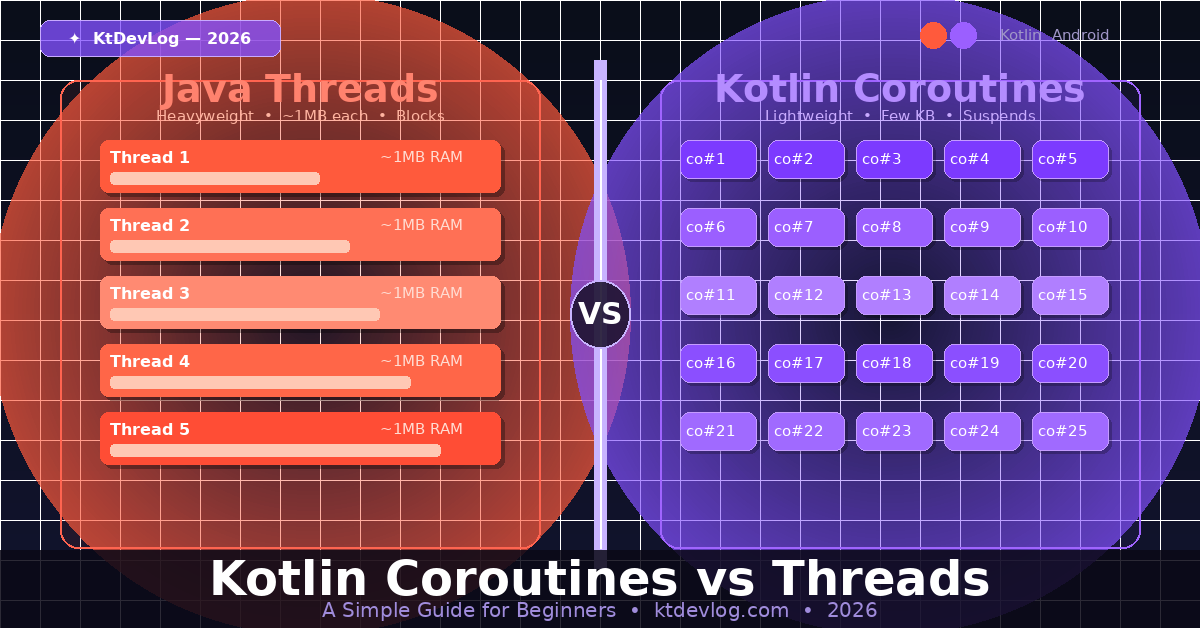
Every thread you create consumes real memory — typically around 1MB of stack space per thread, according to JVM documentation. Spin up 500 threads and you’ve just eaten 500MB of RAM. On a mobile device, that’s a disaster.
Threads are also expensive to create and destroy. The operating system has to allocate resources, schedule them, and manage context switching. When you have hundreds of threads all fighting for CPU time, performance tanks.
And then there’s the fun of managing them. Thread synchronization, race conditions, deadlocks — these are the kinds of bugs that make senior developers cry at 2am. I’ve seen production apps go down because two threads tried to write to the same variable at the same time. It’s not pretty.
Thread pools (like ExecutorService in Java) helped reduce some of this overhead, but the fundamental problem remained: threads are heavyweight.
Kotlin Coroutines: Lightweight Concurrency Done Right
Coroutines were introduced as an official Kotlin feature and became stable in Kotlin 1.3. Google now recommends them as the preferred solution for asynchronous programming on Android.
Here’s the same network fetch using coroutines:
viewModelScope.launch {
    val result = fetchDataFromApi() // suspends, doesn't block
    updateUI(result)
}Clean. Readable. No callback hell. No thread management. Just straightforward code that reads top-to-bottom like normal logic.
The “Suspend” Superpower
The key to understanding coroutines is the suspend keyword. When a coroutine hits a suspend function, it pauses itself — but crucially, it does not block the thread underneath it.
Think back to the coffee shop. When you place your order and sit down, the counter doesn’t close. Other customers can still walk up and order. The counter (thread) keeps working. You (coroutine) are just waiting on the side until your name is called.
That’s exactly what happens in code. The thread is freed up to do other work while the coroutine waits for the network response. When the data arrives, the coroutine resumes right where it left off.
How Lightweight Are They Really?
Here’s a number that genuinely surprised me when I first saw it.
You can launch 100,000 coroutines in Kotlin without crashing your app. Try that with threads and your JVM will throw an OutOfMemoryError before you hit 10,000. JetBrains’ own documentation demonstrates this with a simple example — launch 100K coroutines, each adding 1 to a counter. It works. Threads can’t say the same.
Coroutines are managed in user space (by the Kotlin runtime), not by the OS kernel. This makes them incredibly cheap to create and destroy.
Kotlin Coroutines vs Threads: Side-by-Side Comparison
Let’s put them head to head so you can see the difference clearly.
| Feature | Threads | Coroutines |
|---|---|---|
| Memory per unit | ~1MB | A few KB |
| Creation cost | High (OS level) | Very low (runtime level) |
| Blocking behavior | Blocks the thread | Suspends, frees the thread |
| Max practical count | Hundreds | Hundreds of thousands |
| Code readability | Callback-heavy | Sequential, clean |
| Exception handling | Complex | Built-in with try/catch |
| Android recommendation | Not preferred | ✅ Officially recommended |
The bottom line? For Android development in 2026, coroutines aren’t just a “nice to have.” They’re the standard.
Real-World Android Example: Network Call
Let me show you a practical scenario. You’re building an app that fetches a user’s profile from an API and displays it on screen.
With a Thread:
Thread {
    val user = apiService.getUser() // blocking call
    runOnUiThread {
        nameTextView.text = user.name // must switch back to main thread
    }
}.start()You manually fetch on a background thread, then manually jump back to the main thread to update the UI. More code. More risk of getting it wrong.
With Coroutines:
lifecycleScope.launch {
    val user = withContext(Dispatchers.IO) {
        apiService.getUser() // runs on IO thread, suspends coroutine
    }
    nameTextView.text = user.name // automatically back on main thread
}withContext(Dispatchers.IO) moves the heavy work to a background thread, then automatically returns to the main thread when it’s done. You write it like synchronous code, but it behaves asynchronously. That’s the magic.
When Would You Still Use Threads?
Honest answer: rarely, in modern Android development. But there are edge cases.
If you’re working with low-level system code, integrating a Java library that’s tightly coupled to threads, or doing something where you need explicit OS-level thread control, raw threads still have a place.
For everything else — API calls, database operations, file I/O, background processing — coroutines are cleaner, safer, and more efficient. Platforms like Square’s OkHttp and Retrofit have built-in coroutine support. Room database supports suspend functions natively. The ecosystem has fully embraced them.
FAQ
What is the main difference between coroutines and threads in Kotlin?
Threads are OS-managed, heavyweight units of execution that consume significant memory and block when waiting. Coroutines are lightweight, Kotlin-managed units that suspend instead of blocking — freeing the thread for other work. You can run thousands of coroutines where only hundreds of threads would be feasible.
Are Kotlin coroutines faster than threads?
Not always faster in raw speed, but far more efficient at scale. Because coroutines don’t block threads while waiting, your app can handle many more concurrent operations without exhausting memory or CPU. For I/O-heavy Android apps, this makes a massive practical difference.
Do coroutines run on the main thread?
By default, a coroutine launched with launch {} runs on the thread it was called from. You control where work happens using Dispatchers — Dispatchers.Main for UI work, Dispatchers.IO for network/database, and Dispatchers.Default for CPU-intensive tasks.
Is it hard to learn Kotlin coroutines as a beginner?
The basics are surprisingly approachable. Start with launch, suspend, and withContext — those three concepts cover 80% of real-world usage. The official Kotlin coroutines documentation is genuinely well-written and beginner-friendly.
Should I still learn threads if I’m learning Android in 2026?
Understanding threads conceptually is valuable — it helps you reason about concurrency and debug issues. But for day-to-day Android development, you’ll write coroutines almost exclusively. Learn coroutines first, then build your threading knowledge underneath it.
Conclusion
Kotlin coroutines aren’t just a fancy new API — they’re a fundamentally better way to think about doing multiple things at once in your app. Threads had their era. They solved real problems. But they came with real costs: memory, complexity, and bugs that were genuinely hard to track down.
Coroutines give you the same concurrency power with a fraction of the overhead, cleaner code, and Google’s full backing for Android development.
If you’re just starting out with Kotlin, bookmark the official coroutines guide and start with the basics: launch, suspend, withContext. You don’t need to master everything at once. Write the coffee-shop version of your code — place the order, go sit down, and let the coroutine handle the rest.
The best Android apps aren’t built with more threads. They’re built with smarter ones.