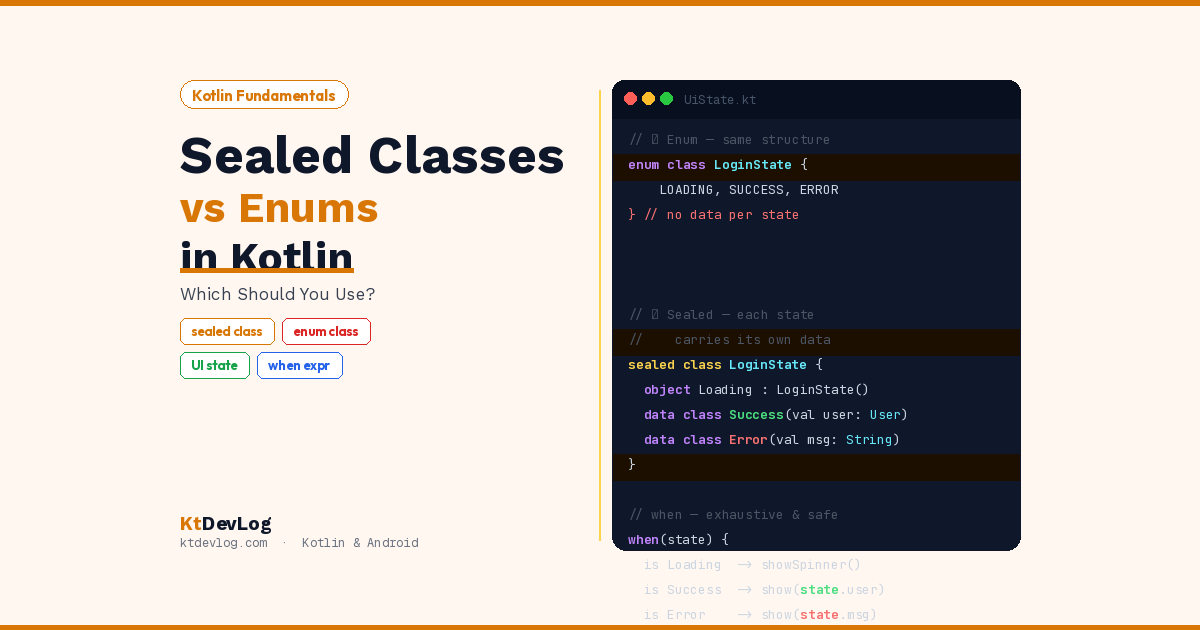

You’re building a login screen. It has three states — loading, success, and error. You reach for an enum class because it’s the first thing that comes to mind. It works. But then the error state needs to show a message. And the success state needs to carry user data. And suddenly your clean enum is surrounded by a web of nullable variables nobody asked for.
Sound familiar?
This is exactly the problem sealed classes in Kotlin were designed to solve. Both enums and sealed classes let you model a fixed set of possibilities — but the way they do it is fundamentally different. And in modern Android development, that difference matters enormously.



In this guide, I’ll break down sealed classes vs enums in Kotlin clearly and honestly, show you what goes wrong when you use enums for UI states, and demonstrate why sealed classes are the standard approach in every professional Android codebase today.
Table of Contents
What Is an Enum Class in Kotlin?
An enum class represents a fixed set of named constants. Each constant is a single instance — a simple label with no variation between them except the name.
enum class NetworkStatus {
    LOADING,
    SUCCESS,
    ERROR
}Using it with a when expression is clean and readable:
fun handleStatus(status: NetworkStatus) {
    when (status) {
        NetworkStatus.LOADING  -> showLoadingSpinner()
        NetworkStatus.SUCCESS  -> showContent()
        NetworkStatus.ERROR    -> showErrorMessage()
    }
}Enums are fantastic for this. No else branch needed — Kotlin knows all possible values at compile time and forces you to handle every one.
You can also attach shared properties to enum constants:
enum class AppTheme(val displayName: String) {
    LIGHT("Light Mode"),
    DARK("Dark Mode"),
    SYSTEM("Follow System")
}Every constant has a displayName. That works perfectly because every constant carries the same type of data.
Here’s the key limitation that appears as soon as your requirements grow: every enum constant must have the same structure. You can’t give SUCCESS a userData property without giving LOADING and ERROR one too — even if they don’t need it.
What Is a Sealed Class in Kotlin?
A sealed class defines a restricted class hierarchy. Every subclass must be defined in the same file (or same package in Kotlin 1.5+). The Kotlin compiler knows every possible subclass at compile time — just like an enum — but each subclass can be completely different from the others.
According to the official Kotlin documentation, sealed classes are ideal for representing restricted hierarchies where each subtype can carry its own data and behaviour.
sealed class NetworkState {
    object Loading : NetworkState()
    data class Success(val data: List<String>) : NetworkState()
    data class Error(val message: String) : NetworkState()
}Three subclasses. Three completely different structures. Loading carries nothing — it’s just a signal. Success carries a list of data. Error carries an error message string.
Using it with when:
fun handleState(state: NetworkState) {
    when (state) {
        is NetworkState.Loading  -> showLoadingSpinner()
        is NetworkState.Success  -> showContent(state.data)
        is NetworkState.Error    -> showError(state.message)
    }
}Notice the is keyword — you’re checking the type, not matching a constant. And inside each branch, Kotlin’s smart cast gives you direct access to that subclass’s specific properties. No casting. No null checks. Just state.data and state.message exactly where you need them.
Sealed Classes vs Enums Kotlin — The Real Differences
Let’s put them side by side so the difference is crystal clear.
Difference 1 — Each State Can Carry Different Data
This is the biggest one. With an enum, every constant must share the same property structure. With a sealed class, each subclass defines its own:
// ❌ Enum approach — forces awkward nullable properties
enum class LoginState {
    LOADING,
    SUCCESS,   // needs user data — but where?
    ERROR      // needs error message — but where?
}

// Forces you to add these separate variables in the ViewModel:
var userData: User? = null       // null unless SUCCESS
var errorMessage: String? = null // null unless ERRORNow compare that to the sealed class approach:
// ✅ Sealed class approach — each state carries exactly what it needs
sealed class LoginState {
    object Loading : LoginState()
    data class Success(val user: User) : LoginState()
    data class Error(val message: String) : LoginState()
}Everything is in one place. No nullable variables scattered around your ViewModel. No mental overhead of “which variables are valid in which state.”
Difference 2 — Compiler Exhaustiveness in when
Both enums and sealed classes give you exhaustive when expressions — the compiler forces you to handle every case. But with sealed classes, this also works for type checks:
// ✅ No else needed — compiler verifies all cases are covered
fun render(state: LoginState): String = when (state) {
    is LoginState.Loading -> "Loading..."
    is LoginState.Success -> "Welcome, ${state.user.name}!"
    is LoginState.Error   -> "Error: ${state.message}"
}Here’s the unique insight most guides miss: if you add a new subclass to LoginState later — say LoginState.SessionExpired — the compiler will flag every single when expression in your entire codebase that doesn’t handle it. You cannot accidentally miss a new state. The compiler is your safety net.
With an enum, you get the same guarantee — but only for constants that all share the same structure. The moment your states need different data, the enum breaks down and you lose that clean structure.
Difference 3 — Subclasses Can Have Different Types
Sealed class subclasses can be object, data class, or regular class — each appropriate for its use case:
sealed class UiEvent {
    object NavigateBack : UiEvent()                      // singleton — no data
    data class ShowToast(val message: String) : UiEvent() // carries a message
    data class NavigateTo(val route: String) : UiEvent()  // carries a route
    class LoadMore(val page: Int, val size: Int) : UiEvent() // carries two values
}An enum can never do this. Every constant is the same type — the enum class itself.
Why Sealed Classes Win for Android UI States
Let’s look at this in a real ViewModel. This is the pattern used in professional Android apps every day.
The Enum Approach — What Goes Wrong
// The enum
enum class LoginUiState {
    IDLE, LOADING, SUCCESS, ERROR
}

// The ViewModel — now needs separate variables for state data
class LoginViewModel : ViewModel() {
    var uiState = MutableStateFlow(LoginUiState.IDLE)
    var loggedInUser: User? = null         // Only valid when SUCCESS
    var errorMessage: String? = null       // Only valid when ERROR

    fun login(email: String, password: String) {
        uiState.value = LoginUiState.LOADING
        viewModelScope.launch {
            try {
                val user = authRepository.login(email, password)
                loggedInUser = user
                uiState.value = LoginUiState.SUCCESS
            } catch (e: Exception) {
                errorMessage = e.message
                uiState.value = LoginUiState.ERROR
            }
        }
    }
}Now your UI has to observe uiState, then separately check loggedInUser and errorMessage. State is spread across three variables. Nothing stops you from accessing loggedInUser when the state is LOADING. It’s fragile, and it gets worse as your app grows.
The Sealed Class Approach — Everything in One Place
// The sealed class — self-contained state
sealed class LoginUiState {
    object Idle    : LoginUiState()
    object Loading : LoginUiState()
    data class Success(val user: User)     : LoginUiState()
    data class Error(val message: String)  : LoginUiState()
}

// The ViewModel — clean, single source of truth
class LoginViewModel : ViewModel() {

    private val _uiState = MutableStateFlow<LoginUiState>(LoginUiState.Idle)
    val uiState: StateFlow<LoginUiState> = _uiState

    fun login(email: String, password: String) {
        _uiState.value = LoginUiState.Loading
        viewModelScope.launch {
            try {
                val user = authRepository.login(email, password)
                _uiState.value = LoginUiState.Success(user)
            } catch (e: Exception) {
                _uiState.value = LoginUiState.Error(e.message ?: "Unknown error")
            }
        }
    }
}Now the UI collects a single StateFlow and handles everything in one when expression:
// In your Fragment or Composable
lifecycleScope.launch {
    viewModel.uiState.collect { state ->
        when (state) {
            is LoginUiState.Idle    -> showIdleScreen()
            is LoginUiState.Loading -> showLoadingSpinner()
            is LoginUiState.Success -> navigateToHome(state.user)
            is LoginUiState.Error   -> showError(state.message)
        }
    }
}One observation. One when. Every piece of data available exactly where you need it. This is the architecture pattern used in production Android apps with Kotlin StateFlow and Kotlin data classes — and now you can see exactly why it works so well.
Bonus — Sealed Interfaces in Kotlin 1.5+
Here’s something most sealed class guides don’t cover: since Kotlin 1.5, you can also use sealed interfaces. They work like sealed classes but allow a subclass to implement multiple sealed interfaces — which sealed classes don’t support since Kotlin only allows single class inheritance.
sealed interface UiState
sealed interface UiEvent

data class LoginSuccess(val user: User) : UiState, UiEvent
data class LoginError(val message: String) : UiState
object NavigateToHome : UiEventLoginSuccess implements both UiState and UiEvent — it represents something that is both a state and triggers an event. This flexibility is genuinely useful in MVI architecture patterns.
For most beginner to intermediate use cases, sealed classes are all you need. Reach for sealed interfaces when a subclass genuinely needs to belong to multiple hierarchies.
Quick Decision Guide — When to Use Which
| Use case | Best choice |
|---|---|
| Simple constants — days, themes, directions | ✅ Enum |
| Tab navigation items | ✅ Enum |
| API response states (loading/success/error) | ✅ Sealed class |
| UI states that carry different data | ✅ Sealed class |
| Error types with different messages | ✅ Sealed class |
| One-time UI events (toast, navigate) | ✅ Sealed class |
| Simple flags with shared properties | ✅ Enum |
| States needing multiple inheritance | ✅ Sealed interface |
The simple rule: if all your cases look the same structurally — use an enum. The moment they start carrying different data — switch to a sealed class.
Frequently Asked Questions
What is the difference between sealed classes and enums in Kotlin?
Enums represent a fixed set of constants where every constant shares the same structure. Sealed classes represent a fixed set of types where each subclass can have completely different data and behaviour. Use enums for simple labels like app themes or navigation directions. Use sealed classes when different states need to carry different data — like UI states where Success holds user data and Error holds an error message.
Why are sealed classes better for UI states in Android?
Because UI states almost always carry different data depending on the state. Loading needs nothing, Success needs the loaded data, Error needs the error message. Sealed classes let each state carry exactly what it needs — no more, no less. This eliminates the scattered nullable variables you’d need alongside an enum and keeps your entire state in a single observable StateFlow.
Do sealed classes work with when expressions in Kotlin?
Yes — and this is one of their biggest advantages. The Kotlin compiler knows every subclass of a sealed class at compile time, so when expressions on sealed classes are exhaustive. If you add a new subclass, the compiler flags every when that doesn’t handle it. You can’t accidentally miss a state. This compile-time safety is what makes sealed classes so reliable for state management.
What is a sealed interface in Kotlin?
A sealed interface works like a sealed class but allows a type to implement multiple sealed interfaces — since Kotlin only supports single class inheritance. Introduced in Kotlin 1.5, sealed interfaces are useful when a subtype needs to belong to more than one restricted hierarchy simultaneously. For most standard UI state patterns, a sealed class is sufficient.
Can I use enums and sealed classes together?
Yes. The official Kotlin documentation actually shows this pattern — a sealed class can contain an enum to represent severity levels or categories within a state. They’re not mutually exclusive. Use each where it fits best: enums for shared constant properties within a state, sealed classes for the state hierarchy itself.
Conclusion
Sealed classes vs enums in Kotlin isn’t really a competition — they’re tools for different jobs. Enums are perfect for simple, flat sets of constants where every value looks the same. The moment your states need to carry different data, enums start fighting against you.
Sealed classes solve this cleanly. Each subclass defines exactly the data it needs. The compiler enforces exhaustive handling. Your ViewModel emits a single StateFlow. Your UI handles everything in one when expression. It’s the architecture pattern that makes modern Android apps maintainable, scalable, and safe.
Start with your next feature’s UI state. Define it as a sealed class — Loading, Success with data, Error with a message. Connect it to a StateFlow in your ViewModel and collect it in your UI. Once you’ve done it once, you’ll never go back to the scattered enum approach.
For everything to click together, explore how Kotlin data classes power the Success and Error subclasses, how Kotlin StateFlow and SharedFlow connect your sealed state to the UI reactively, and how Kotlin control flow — especially when expressions — makes working with sealed classes feel completely natural.
The compiler is your best teammate. Sealed classes let it do its job.