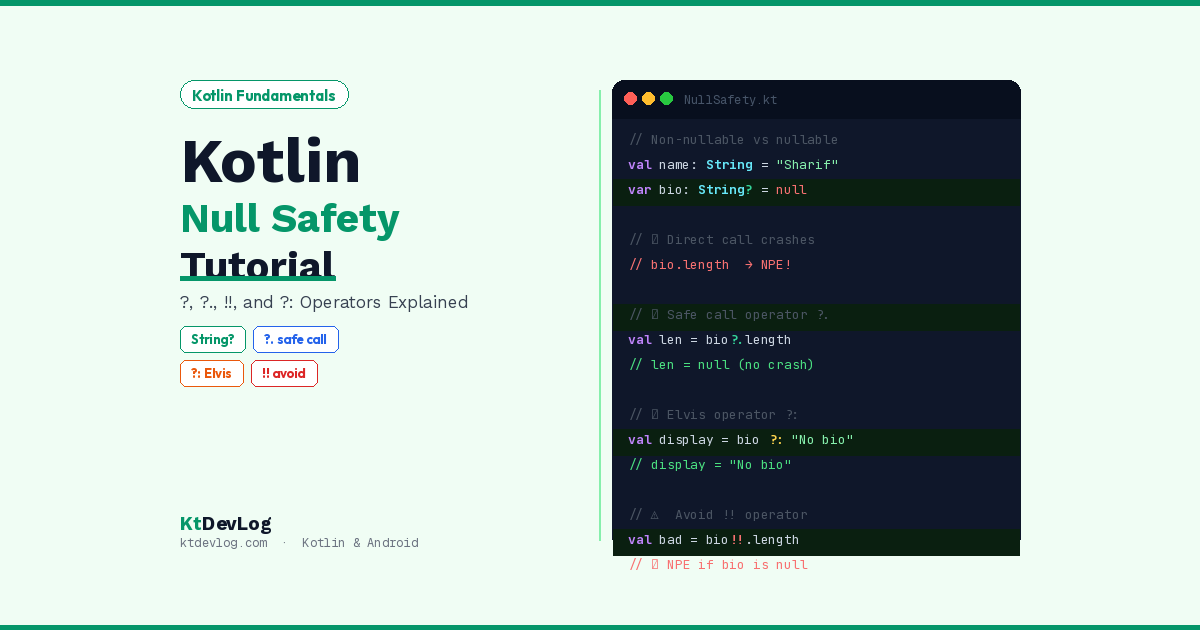

Java developers have a nickname for NullPointerExceptions. They call them “the billion-dollar mistake.”
That name comes from Tony Hoare — the computer scientist who invented the null reference back in 1965. He later said it was a mistake that had caused a billion dollars worth of errors, vulnerabilities, and crashes over the decades. If you’ve ever seen an Android app crash with NullPointerException: Attempt to invoke virtual method on a null object reference — you know exactly what he meant.
Kotlin null safety tutorial is one of the most searched Kotlin topics for a reason. Kotlin was designed from the ground up to make null-related crashes impossible — or at least, impossible by accident. The compiler steps in before your code even runs and says: “hey, this might be null, deal with it.”



This guide walks you through everything — nullable types, the safe call operator ?., the Elvis operator ?:, the not-null assertion !!, smart casts, and real Android patterns that put it all together. By the end, you’ll understand exactly why Kotlin’s approach to null is one of its best features.
Table of Contents
Why Null Is Such a Problem in the First Place
Before we get into Kotlin’s solution, let’s understand the problem clearly.
In Java, any variable that holds an object can hold null. The compiler doesn’t warn you. The IDE won’t stop you. You only find out at runtime — when your app crashes in the hands of a real user.
// Java — this compiles perfectly fine
String username = null;
int length = username.length(); // 💥 NullPointerException at runtimeThe crash happens because you called .length() on something that doesn’t exist. Java had no way to prevent this at compile time.
Kotlin’s solution is elegant: nullability is part of the type system. According to the official Kotlin documentation, Kotlin’s type system is designed to eliminate the danger of null references from code. In Kotlin, the compiler knows — at compile time — which variables can hold null and which cannot. And it forces you to handle the null case before your code will even build.
Nullable vs Non-Nullable Types
In Kotlin, every type is non-nullable by default. If you declare a String, it cannot hold null. Full stop.
var username: String = "Sharif"
username = null // ❌ Error: Null can not be a value of a non-null type StringThe compiler rejects this. username is a String — it must always contain a real string.
To allow null, you explicitly opt in by adding a ? after the type:
var username: String? = "Sharif"
username = null // ✅ Allowed — String? can hold nullThat single ? is the foundation of everything. It’s Kotlin telling the compiler — and the next developer reading your code — “this value might not exist.”
The critical difference between String and String?:
val a: String  = "Sharif"   // Non-nullable — NEVER null
val b: String? = null        // Nullable — CAN be null

println(a.length)   // ✅ Safe — compiler guarantees a is not null
println(b.length) // ❌ Error — b might be null, compiler stops youThis is Kotlin null safety in its simplest form. The compiler won’t let you call methods on a nullable type without handling the null case first. Java would let that second line compile and then crash at runtime. Kotlin catches it before the program even starts.
The Safe Call Operator ?.
The safe call operator ?. is how you work with nullable types without writing verbose null checks everywhere.
Instead of:
if (username != null) {
    println(username.length)
}You write:
println(username?.length)If username is not null — username?.length returns the length. If username is null — username?.length returns null instead of crashing. The call is simply skipped.
Here’s where it gets really powerful — chaining safe calls:
data class Address(val city: String?)
data class User(val address: Address?)

val user: User? = User(Address("Dhaka"))

val city = user?.address?.city
println(city)// Output:
DhakaNow watch what happens when something in the chain is null:
val user2: User? = null
val city2 = user2?.address?.city
println(city2)// Output:
nullIf user2 is null, the entire chain short-circuits and returns null immediately. No crash. No NullPointerException. Just null. This chaining pattern is invaluable when working with API responses, where any level of the data hierarchy might be missing.
Safe Calls in Android Development
In real Android apps, you’ll see safe calls constantly when working with views, context, and fragment arguments:
// Safe call on a nullable view reference
val text = binding.usernameText?.text?.toString()

// Safe call on fragment arguments
val userId = arguments?.getString("USER_ID")

// Safe call chain on API response
val profilePicUrl = apiResponse?.user?.profile?.imageUrlEvery one of these would be a potential crash without safe calls. With ?., the worst that happens is you get null — which you can handle gracefully.
The Elvis Operator ?:
The Elvis operator ?: solves the next question that naturally follows the safe call: “okay, if it IS null, what should I use instead?”
It provides a default value when an expression is null:
val username: String? = null
val displayName = username ?: "Guest"
println(displayName)// Output:
GuestIf username is not null — displayName gets username‘s value. If username is null — displayName gets "Guest". Clean. One line. No if-else needed.
Combine it with a safe call for the most common real-world pattern:
val username: String? = null
val length = username?.length ?: 0
println(length)// Output:
0username?.length returns null because username is null. The ?: 0 catches that null and provides 0 as the fallback. This is the pattern you’ll write dozens of times in every Android project — safe call to get a value, Elvis to provide the default.
Elvis With Early Returns — A Pattern Most Guides Skip
Here’s the unique insight that separates developers who use Kotlin null safety well from those who use it superficially. The right side of Elvis doesn’t have to be a simple value — it can be a return or throw:
fun getUserDisplayName(userId: String?): String {
    val id = userId ?: return "Unknown User"
    // id is guaranteed non-null here
    return fetchUserName(id)
}
fun processOrder(orderId: String?) {
val id = orderId ?: throw IllegalArgumentException("Order ID cannot be null")
// id is guaranteed non-null here
processWithId(id)
}This pattern — using Elvis to bail out early when something is null — is incredibly clean. It eliminates nested null checks and keeps your function logic flat and readable. You’ll see this in every clean Kotlin codebase. It works because Kotlin’s return and throw are expressions, not just statements.
The Not-Null Assertion Operator !!
The !! operator is Kotlin’s escape hatch. It tells the compiler: “I know this might be nullable, but I promise you it’s not null right now — trust me.”
val username: String? = "Sharif"
val length = username!!.length
println(length)// Output:
6When you use !!, you’re taking responsibility. If username is null when you call username!!.length, Kotlin throws a NullPointerException — just like Java would. The compiler’s safety net is gone.
val username: String? = null
val length = username!!.length // 💥 NullPointerException at runtimeLet me be completely honest: !! is a code smell in most situations. Every time you use it, you’re essentially writing Java — you’re bypassing Kotlin’s safety and hoping you’re right about the value not being null.
The legitimate use cases for !! are narrow:
- When you’re 100% certain a value is non-null due to logic the compiler can’t see
- When interfacing with Java code that doesn’t use
@Nullableannotations - In unit tests where null would mean the test itself is broken
In Android development, you’ll sometimes see !! used with ViewBinding or late-initialized properties. But even then, lateinit var is usually a cleaner option than !!.
The rule: if you find yourself using !! frequently, rethink your design. It’s almost always a sign that null should be handled properly rather than asserted away.
Smart Casts — Kotlin’s Null Check Intelligence
Here’s something that makes Kotlin null safety genuinely elegant: once you’ve checked that a nullable value is not null, Kotlin automatically treats it as non-nullable for the rest of that scope.
val username: String? = "Sharif"

if (username != null) {
    // Inside this block, Kotlin knows username is not null
    // Smart cast: username is now treated as String, not String?
    println(username.length)  // ✅ No ?. needed
    println(username.uppercase())
}The compiler tracked your null check and automatically cast username to String inside the if block. You don’t need ?. — Kotlin already knows it’s safe.
Smart casts work with when expressions too:
fun printLength(value: Any?) {
    when {
        value == null         -> println("Value is null")
        value is String       -> println("String length: ${value.length}")
        value is Int          -> println("Integer: $value")
        else                  -> println("Unknown type: $value")
    }
}This connects directly to the Kotlin control flow patterns you already know — smart casts make when expressions even more powerful when dealing with nullable and typed values.
Real Android Pattern — Handling API Responses
Let’s bring it all together in the pattern you’ll use most in real Android development. This is how null safety works in a ViewModel handling an API call:
data class User(
    val id: String?,
    val name: String?,
    val email: String?,
    val avatarUrl: String?
)

fun bindUserToUi(user: User?) {

    // Elvis — safe defaults for all nullable fields
    val displayName  = user?.name     ?: "Anonymous"
    val displayEmail = user?.email    ?: "No email provided"
    val avatarUrl    = user?.avatarUrl ?: "https://ktdevlog.com/default-avatar.png"

    // Safe call chain — nested nullable access
    val userId = user?.id?.uppercase() ?: "UNKNOWN"

    binding.nameText.text  = displayName
    binding.emailText.text = displayEmail
    binding.userId.text    = userId

    // Load avatar safely
    Glide.with(this)
        .load(avatarUrl)
        .into(binding.avatarImage)
}Every nullable field handled in one clean block. No if (user != null) walls. No NullPointerException risk. This is the pattern that makes Kotlin Android code read clearly and crash rarely.
Pair this with Kotlin data classes for your model layer, Kotlin StateFlow to pipe the state to your UI, and Kotlin sealed classes to represent loading/success/error — and you have a complete, null-safe modern Android architecture.
Null Safety Quick Reference
| Operator | Name | What It Does |
|---|---|---|
String? | Nullable type | Declares a type that can hold null |
?. | Safe call | Calls a method only if value is non-null |
?: | Elvis operator | Provides a default when value is null |
!! | Not-null assertion | Forces non-null — throws NPE if null |
| Smart cast | Auto-cast | Compiler treats value as non-null after null check |
let {} | Scope function | Executes block only if value is non-null |
Frequently Asked Questions
What is Kotlin null safety?
Kotlin null safety is a feature built into Kotlin’s type system that prevents NullPointerExceptions by making nullability explicit at compile time. Every type in Kotlin is non-nullable by default — a String can never hold null. To allow null, you explicitly declare a nullable type using ? — like String?. The compiler then forces you to handle the null case before your code will build, catching null-related bugs before they reach production.
What is the difference between ?. and !! in Kotlin?
?. is the safe call operator — it calls a method only if the value is non-null, and returns null instead of crashing if the value is null. !! is the not-null assertion operator — it bypasses Kotlin’s null safety and throws a NullPointerException if the value is null at runtime. Use ?. as your default. Use !! only when you’re absolutely certain the value isn’t null and have no other option — it should be rare in clean Kotlin code.
What does the Elvis operator ?: do in Kotlin?
The Elvis operator ?: provides a fallback value when an expression evaluates to null. For example, val name = username ?: "Guest" assigns "Guest" to name if username is null, or assigns the value of username if it isn’t. It’s commonly combined with the safe call operator: val length = text?.length ?: 0 returns the text length, or 0 if text is null.
How do I fix a NullPointerException in Kotlin?
In Kotlin, you generally prevent NPEs at compile time rather than fixing them at runtime. Declare nullable types with ?, use safe calls ?. instead of direct calls on nullable values, provide defaults with the Elvis operator ?:, and avoid !! unless absolutely necessary. If you’re getting an NPE from a !! call, replace it with ?. or ?: to handle the null case gracefully instead of crashing.
When should I use !! in Kotlin?
Use !! only when you are 100% certain a value is non-null due to logic the compiler can’t verify, and when there’s genuinely no cleaner alternative. Common legitimate uses include interfacing with Java code that doesn’t have null annotations, and cases where a null value would indicate a programming error that should crash immediately. In most normal Android development, ?. and ?: cover every scenario — if you’re reaching for !! frequently, reconsider your approach.
Conclusion
Kotlin null safety tutorial covers one of the features that makes Kotlin genuinely safer than Java — not just syntactically cleaner, but architecturally sounder. The compiler becomes your teammate, catching null-related bugs before they ever reach a user’s device.
The rules are simple once internalized. Use String? when something can legitimately be null. Use ?. to call methods safely on nullable values. Use ?: to provide sensible defaults. Use !! sparingly and deliberately. Trust the smart cast. And when you find yourself fighting the null system — stop, and ask whether your design needs rethinking.
Every crash prevented at compile time is a crash that never ruins a user’s experience. That’s the real value of null safety — not just cleaner syntax, but fundamentally more reliable software.
From here, deepen your understanding of how Kotlin handles data with Kotlin variables — val vs var and Kotlin data types, then see null safety in action inside Kotlin extension functions where nullable receiver types enable powerful patterns with zero risk.
The best NullPointerException is the one the compiler caught before your app shipped.