
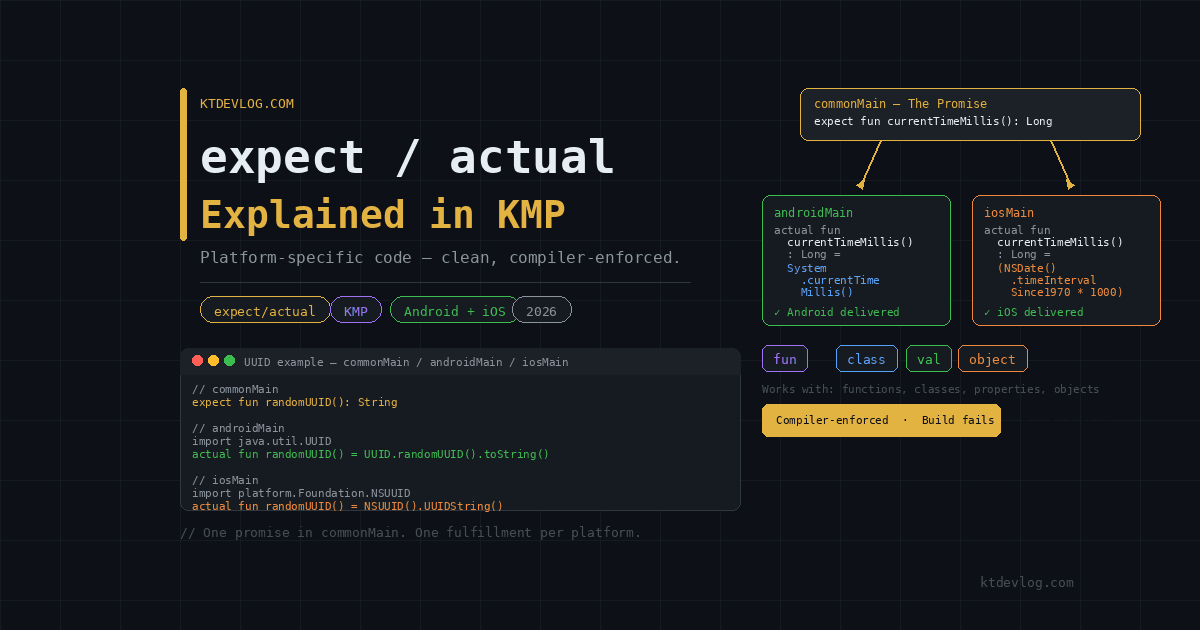

You’re writing shared Kotlin code and everything flows cleanly — until you need the current timestamp. On Android that’s System.currentTimeMillis(). On iOS it’s NSDate().timeIntervalSince1970. Two platforms, two completely different APIs, and your commonMain code can’t call either one directly.
This is the wall every KMP developer hits within their first week. And the mechanism Kotlin built to solve it — expect/actual — is one of the most elegant language features in the entire multiplatform ecosystem.
Once it clicks, you’ll use it constantly. It’s behind the database driver setup you saw in the SQLDelight guide, the HTTP engine switching in Ktor, and the ViewModel scope on iOS. Nearly every place where KMP hands off to platform-native code, expect/actual is the bridge making it work. This guide explains the mechanism from first principles, walks through five practical real-world examples, and covers the mistakes that catch developers off guard.




Table of Contents
What expect/actual Actually Does
The mental model is simple. expect is a promise. actual is the delivery.
In commonMain, you declare what you need — a function, a class, a property — without any implementation. You’re telling the Kotlin compiler: “something called this will exist on every platform, but I’m not saying how it works yet.” That declaration carries the expect keyword.
In androidMain and iosMain, you fulfill that promise with an actual declaration that contains the real platform-specific code. The Kotlin compiler enforces this contract at compile time — miss an actual for any expect and the build fails immediately, before you ever run the app.
commonMain          androidMain         iosMain
───────────         ───────────         ───────
expect fun          actual fun          actual fun
  currentTime()       currentTime() =     currentTime() =
                        System             NSDate()
                          .currentTime       .timeInterval
                          Millis()             Since1970
                                               .toLong() * 1000
That’s the entire concept. One promise in shared code, one fulfillment per platform. The rest is just applying this pattern to different types of constructs.
What makes it genuinely powerful is the compiler guarantee. Unlike runtime platform checks — if (Platform.isAndroid) — the expect/actual contract is verified at build time. If you add a new target (say, desktop) later, every expect declaration in your codebase will immediately show a build error until you provide the actual implementation. Nothing slips through.
expect/actual for Functions — The Most Common Pattern
Functions are the simplest and most frequent use of this mechanism. Any time you need a single operation that calls a different native API per platform, an expect fun is the right tool.
The timestamp example from above is a classic. Here it is in full:
// shared/src/commonMain/kotlin/com/ktdevlog/platform/Time.kt

expect fun currentTimeMillis(): Long
// shared/src/androidMain/kotlin/com/ktdevlog/platform/Time.kt
actual fun currentTimeMillis(): Long = System.currentTimeMillis()// shared/src/iosMain/kotlin/com/ktdevlog/platform/Time.kt
import platform.Foundation.NSDate
actual fun currentTimeMillis(): Long =
(NSDate().timeIntervalSince1970 * 1000).toLong()Three files. The package is identical across all three — com.ktdevlog.platform. That’s a requirement the compiler enforces: expect and actual declarations must live in the same package, or the compiler won’t match them.
Another frequently used example is UUID generation. Android has java.util.UUID. iOS has NSUUID from the Foundation framework. One expect fun covers both:
// commonMain
expect fun randomUUID(): String
// androidMain
import java.util.UUID
actual fun randomUUID(): String = UUID.randomUUID().toString()// iosMain
import platform.Foundation.NSUUID
actual fun randomUUID(): String = NSUUID().UUIDString()Call randomUUID() anywhere in commonMain. The compiler routes to the right platform automatically. Clean, type-safe, and zero runtime overhead.
expect/actual for Classes — More Power, More Nuance
Classes follow the same contract as functions, but with an important restriction: an expect class cannot have a body in commonMain. No properties, no methods, no default values. The declaration is purely structural — a name, a constructor signature, and nothing else.
A real-world example is a platform logger:
// commonMain
expect class PlatformLogger() {
    fun log(tag: String, message: String)
}
// androidMain
import android.util.Log
actual class PlatformLogger {
actual fun log(tag: String, message: String) {
Log.d(tag, message)
}
}// iosMain
actual class PlatformLogger {
actual fun log(tag: String, message: String) {
println("[$tag] $message")
}
}The Android version uses Log.d — Android’s native logcat system. The iOS version prints to the Xcode console with a formatted tag. Both satisfy the same contract declared in commonMain.
One thing that surprises developers: the actual class on iOS can implement platform-specific interfaces or extend platform types that the expect class knows nothing about. The actual side can add more than the expect side requires — it just can’t provide less.
expect class vs interface: Which Should You Use?
This is a genuinely common question. Interfaces give you default implementations and work well with dependency injection. expect class gives you compile-time enforcement with less ceremony.
The practical rule: use expect/actual when the difference is purely about which native API to call, and use an interface when you need the abstraction to be injectable, mockable in tests, or composable with other classes. For simple platform utilities — loggers, timestamp functions, UUID generators, UUID generators — expect/actual is cleaner. For complex platform integrations like camera or location, an interface with expect factory functions is more maintainable.
expect/actual for Properties
Properties work exactly like functions. You declare the shape in commonMain, and each platform provides the value.
// commonMain
expect val platformName: String
// androidMain
actual val platformName: String = "Android"// iosMain
actual val platformName: String = "iOS"More practically, you’ll use this to expose platform-specific build information:
// commonMain
expect val appVersion: String
// androidMain
actual val appVersion: String = BuildConfig.VERSION_NAME// iosMain
actual val appVersion: String =
NSBundle.mainBundle.objectForInfoDictionaryKey("CFBundleShortVersionString") as? String ?: "unknown"Call appVersion anywhere in your shared ViewModel or repository. Android reads it from BuildConfig. iOS pulls it from the bundle’s Info.plist. Your shared code sees one property and doesn’t need to care about either source.
Real-World Pattern: DatabaseDriverFactory
You’ve already seen this pattern if you followed the SQLDelight local storage guide. The database driver is the most widely used expect/actual class in KMP projects — it’s almost always one of the first things you set up.
Here’s why it needs expect/actual: SQLDelight’s Android driver requires a Context parameter. iOS doesn’t have Context at all. They need completely different constructors with completely different dependencies.
// commonMain
import app.cash.sqldelight.db.SqlDriver

expect class DatabaseDriverFactory {
    fun createDriver(): SqlDriver
}
// androidMain
import android.content.Context
import app.cash.sqldelight.driver.android.AndroidSqliteDriver
actual class DatabaseDriverFactory(private val context: Context) {
actual fun createDriver(): SqlDriver =
AndroidSqliteDriver(AppDatabase.Schema, context, "ktdevlog.db")
}// iosMain
import app.cash.sqldelight.driver.native.NativeSqliteDriver
actual class DatabaseDriverFactory {
actual fun createDriver(): SqlDriver =
NativeSqliteDriver(AppDatabase.Schema, "ktdevlog.db")
}Notice something important here. The Android actual class has a constructor parameter — context: Context — that the iOS actual class doesn’t have. This is intentional and allowed. The expect class defines the minimum contract. Each platform’s actual class can add what it needs as long as it satisfies that contract.
On Android, you instantiate it with DatabaseDriverFactory(context). On iOS, you instantiate it with DatabaseDriverFactory(). Both call createDriver() the same way from shared code — the platform-specific setup is invisible to commonMain.
expect/actual for the Ktor Engine — Another Classic
The Ktor HTTP client engine is another pattern you’ll recognize from earlier in this series. The networking layer uses expect/actual to swap between OkHttp on Android and Darwin on iOS:
// commonMain
import io.ktor.client.HttpClient

expect fun createHttpClient(): HttpClient
// androidMain
import io.ktor.client.engine.okhttp.OkHttp
import io.ktor.client.plugins.contentnegotiation.ContentNegotiation
import io.ktor.serialization.kotlinx.json.json
import kotlinx.serialization.json.Json
actual fun createHttpClient(): HttpClient = HttpClient(OkHttp) {
install(ContentNegotiation) {
json(Json { ignoreUnknownKeys = true })
}
}// iosMain
import io.ktor.client.engine.darwin.Darwin
import io.ktor.client.plugins.contentnegotiation.ContentNegotiation
import io.ktor.serialization.kotlinx.json.json
import kotlinx.serialization.json.Json
actual fun createHttpClient(): HttpClient = HttpClient(Darwin) {
install(ContentNegotiation) {
json(Json { ignoreUnknownKeys = true })
}
}Your repository in commonMain calls createHttpClient() and gets a fully configured HttpClient back. It has no idea whether it’s talking to OkHttp or Darwin. That ignorance is the design — shared code works with abstractions, platform code handles implementation details.
The Rules That Catch Developers Off Guard
Three constraints trip up nearly every developer working with expect/actual for the first time.
Same package, always. The expect and all its actual counterparts must be in the exact same package. com.ktdevlog.platform in commonMain must match com.ktdevlog.platform in androidMain and iosMain. Different package names mean the compiler can’t match them, and you get a cryptic “no actual” error that doesn’t immediately point to the real cause.
No body on expect declarations. An expect fun or expect class cannot have an implementation in commonMain. Not even a default value, not even a comment block that Android Studio auto-formats into a stub. The declaration is the contract — the body belongs only in actual.
Every target needs an actual. If your KMP project targets Android, iOS, and desktop, every expect declaration needs three actual implementations — one for each target. Adding a new target to your build.gradle.kts without providing the corresponding actual declarations breaks the build immediately. This is the compiler enforcement working as designed.
Frequently Asked Questions
What’s the difference between expect/actual and an interface in KMP?
An interface defines a contract through inheritance — classes implement it. expect/actual defines a contract through the compiler — every platform must provide an actual or the build fails. Interfaces work well when you need mockability, default implementations, or DI integration. expect/actual is better for direct native API access where you just need different code per platform without the overhead of a class hierarchy. Many production apps use both together: an expect factory function that returns an interface implementation.
Can an expect class have constructor parameters?
The expect class itself can declare constructor parameters, but each actual class can have its own additional constructor parameters beyond those. The Android DatabaseDriverFactory(context: Context) is the canonical example — the expect class has no parameters, but the Android actual adds context because Android needs it. iOS doesn’t add it because iOS doesn’t need it.
What happens if I forget to add an actual declaration?
The Kotlin compiler throws a compile-time error immediately: Expected function 'functionName' has no actual declaration in module. You cannot build or run the project until every expect declaration has a matching actual in every target. This is intentional — it makes missing implementations impossible to ship by accident.
Can I use expect/actual in test source sets?
Yes, fully. You can declare expect in commonTest and provide actual in androidTest and iosTest. This is useful for providing test utilities that use platform-specific testing libraries — Robolectric on Android, XCTest helpers on iOS — while writing the actual test logic once in commonTest.
Is expect/actual the only way to write platform-specific code in KMP?
No — it’s one of three approaches. The others are interfaces with platform-specific implementations (more flexible, DI-friendly) and using platform source sets directly without any abstraction (when the platform-specific code doesn’t need to be called from commonMain at all). The official Kotlin documentation on expected and actual declarations recommends choosing expect/actual for simple cases and interfaces for complex ones.
Conclusion
expect/actual is the mechanism that makes KMP honest. It doesn’t pretend that Android and iOS are the same — it acknowledges they’re different and gives you a compiler-enforced way to handle those differences cleanly. One declaration in shared code. One implementation per platform. The compiler does the bookkeeping.
You’ve seen it working in every post in this series — the Ktor engine, the SQLDelight driver, the ViewModel scope on iOS. Now you understand why those patterns are built that way, and you can apply the same thinking to any platform-specific API your app needs: timestamps, UUIDs, file paths, device info, network state, or anything else that looks different under the hood on Android vs iOS.
If you’re building toward a production KMP architecture, the next natural step is dependency injection — wiring all these platform-specific implementations together without manual constructor passing through every layer. That’s exactly what the upcoming Koin for KMP guide covers.
Write the contract once. Let each platform sign it in its own handwriting.


Comments 1