
Nobody migrates to KMP overnight. Nobody should.
You’ve got a production Android app — real users, real data, real crash reports to fix on Monday morning. The last thing your team needs is a three-month feature freeze while someone rewrites everything from scratch. That’s not how successful KMP migrations happen in 2026.
The teams doing this well — Cash App, Netflix, Touchlab clients — all follow the same principle: move incrementally, keep shipping, never break the Android app. Each migration step is small enough that the app stays green on CI. Each new shared module proves the concept before the next one gets touched.

I’ve seen migrations go sideways exactly when teams try to do too much at once. They pull Retrofit out before Ktor is proven, gut their Room database before SQLDelight is stable, and suddenly they have a broken Android app and a half-finished iOS target that nobody’s deployed yet.
This guide takes the other approach. You’ll migrate android to kmp by working outward from the safest, least risky layer to the most complex — with real Gradle config, real code, and real decisions at each step.
Table of Contents
Before You Write a Single Line of Code — Audit First
The biggest mistake teams make is jumping straight into the shared module without understanding what they’re actually moving. Spend a day on this audit. It saves weeks later.
Open your Android project and answer four questions honestly:
What third-party dependencies does your business logic use? Retrofit? Room? Gson? RxJava? Each of these has a KMP equivalent — Ktor, SQLDelight, kotlinx.serialization, coroutines — but the migration path for each is different. Libraries like RxJava need to be migrated to coroutines before you touch KMP. Trying to bring RxJava into commonMain is a dead end.
How modularized is your project? A flat single-module app is harder to migrate than a well-modularized one. If everything lives in :app, you’ll need to extract a :shared module before moving anything. Multi-module projects with clear :data, :domain, and :feature separations migrate significantly faster — each module becomes a candidate for KMP independently.
How much Java is in your shared logic? KMP works with Kotlin only. Pure-Kotlin business logic moves cleanly. Java code needs a Kotlin conversion pass first — IntelliJ’s built-in Java-to-Kotlin converter handles most of it automatically, but it’s a required step you can’t skip.
Are your ViewModels testable in isolation? If your ViewModels have Android framework dependencies baked in — Context, Application, Android-specific lifecycle calls — they’ll need cleanup before they can live in commonMain. ViewModels that only touch repositories and use coroutines move almost directly.
Write down your answers. This audit shapes your migration order completely.
The Migration Ladder: Which Layer to Move First
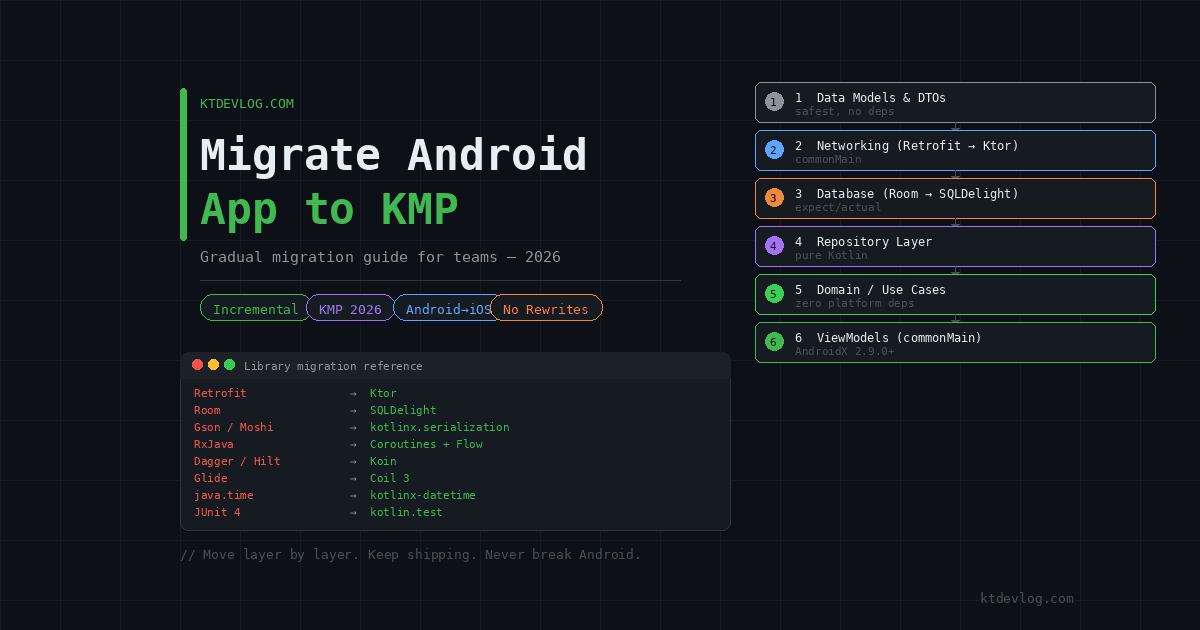
Every KMP migration follows the same dependency order — bottom of the stack up. Not because it’s a rule someone made up, but because each layer depends on the one below it. Move the networking layer first and your domain layer can follow immediately. Try to move the domain layer first and you’ll hit twenty missing dependencies within ten minutes.
Here’s the ladder, in order:
1. Data Models & DTOs          ← safest, zero dependencies
2. Networking Layer (Ktor)     ← replaces Retrofit
3. Local Database (SQLDelight) ← replaces Room
4. Repository Layer            ← wires networking + storage
5. Domain / Use Cases          ← pure business logic
6. ViewModels (commonMain)     ← presentation layer
7. UI (Compose Multiplatform)  ← optional, last step
Each rung is a shippable milestone. After step 2, your Android app still works — it just uses Ktor instead of Retrofit internally. After step 3, it still works — just SQLDelight instead of Room. The iOS target gets usable code from day one of step 2, even if iOS isn’t live yet.
Step 1 — Add the Shared KMP Module to Your Existing Project
Don’t create a new KMP project and try to merge it. Add a shared module directly into your existing Android project. Android Studio makes this straightforward.
Go to File → New → New Module, then select Kotlin Multiplatform Shared Module. Name it shared. Android Studio applies the KMP plugin, creates the commonMain, androidMain, and iosMain source sets, and generates the basic module structure automatically.
Then wire it into your existing :app module’s build.gradle.kts:
// app/build.gradle.kts
dependencies {
    implementation(project(":shared"))
}Your Android app now has access to everything in shared/src/commonMain. Nothing has moved yet — the shared module is empty. But the structure is in place, Gradle syncs clean, and your app still builds. That’s the goal of Step 1.
Important for AGP 9.x users: If your project uses Android Gradle Plugin 9.0 or higher, the com.android.library plugin is no longer compatible with KMP modules. Switch to the new com.android.kotlin.multiplatform.library plugin for your shared module:
// shared/build.gradle.kts
plugins {
    alias(libs.plugins.kotlinMultiplatform)
    alias(libs.plugins.androidMultiplatformLibrary)  // AGP 9+ only
}Step 2 — Migrate Your Data Models First
Data models are the safest first move. They have no platform dependencies, no third-party library coupling, and they’re needed by everything above them in the stack. Start here, build confidence, then move up.
Take a typical Android data class:
// Old: app/src/main/kotlin/com/ktdevlog/model/Post.kt
data class Post(
    val id: Int,
    val userId: Int,
    val title: String,
    val body: String
)Move it to commonMain and add @Serializable:
// New: shared/src/commonMain/kotlin/com/ktdevlog/model/Post.kt
import kotlinx.serialization.Serializable

@Serializable
data class Post(
    val id: Int,
    val userId: Int,
    val title: String,
    val body: String
)Update the import in your Android code — same class, different package now. The app still compiles. Run your existing tests. Everything passes.
That’s the migration pattern in miniature: move a file, update imports, verify nothing broke. Repeat.
Step 3 — Replace Retrofit with Ktor
This is where most teams feel the most friction, because Retrofit is deeply embedded in Android projects. The good news: the actual migration is more mechanical than it feels. Retrofit and Ktor follow the same conceptual model — define an API contract, make HTTP calls, deserialize responses. The syntax is different; the logic isn’t.
Start by adding Ktor to your shared module. If you need the full dependency setup, the KMP networking with Ktor guide covers it in detail.
Here’s what a typical Retrofit interface looks like:
// Old Android — Retrofit
interface PostApiService {
    @GET("posts")
    suspend fun getPosts(): List<Post>

    @GET("posts/{id}")
    suspend fun getPost(@Path("id") id: Int): Post
}The equivalent in Ktor inside commonMain:
// New KMP — Ktor in commonMain
class PostApiService(private val client: HttpClient) {

    private val baseUrl = "https://jsonplaceholder.typicode.com"

    suspend fun getPosts(): List<Post> =
        client.get("$baseUrl/posts").body()

    suspend fun getPost(id: Int): Post =
        client.get("$baseUrl/posts/$id").body()
}Same operations, different library. The suspend functions work identically on Android and iOS. Your existing ViewModel code that calls getPosts() doesn’t change — only the implementation underneath it does.
Once Ktor is in commonMain and your Android app builds clean with it, Retrofit comes out entirely. Don’t keep both running in parallel longer than one sprint. The sooner Retrofit is gone, the cleaner the codebase.
Step 4 — Replace Room with SQLDelight
Room is the most common source of migration complexity, mostly because of the Context dependency in RoomDatabase.Builder. SQLDelight handles this cleanly through the expect/actual pattern for the driver — Android uses AndroidSqliteDriver with a Context, iOS uses NativeSqliteDriver without one.
The full SQLDelight setup is covered step by step in the SQLDelight local storage guide. For the migration specifically, the key shift is mental: instead of annotated Kotlin classes, you write SQL directly in .sq files. The generated Kotlin API is cleaner and compile-time-validated, but the first .sq file feels unfamiliar until you’ve written two.
Your existing Room @Entity class:
// Old: Room entity
@Entity(tableName = "notes")
data class NoteEntity(
    @PrimaryKey(autoGenerate = true) val id: Int = 0,
    val title: String,
    val body: String,
    val createdAt: Long
)Becomes this in a SQLDelight .sq file:
-- shared/src/commonMain/sqldelight/com/ktdevlog/db/Note.sq
CREATE TABLE Note (
    id        INTEGER NOT NULL PRIMARY KEY AUTOINCREMENT,
    title     TEXT    NOT NULL,
    body      TEXT    NOT NULL,
    createdAt INTEGER NOT NULL
);

getAllNotes:
SELECT * FROM Note ORDER BY createdAt DESC;

insertNote:
INSERT INTO Note(title, body, createdAt) VALUES(:title, :body, :createdAt);

deleteNote:
DELETE FROM Note WHERE id = :id;Same data, same operations. Your repository layer barely changes — it calls queries.getAllNotes() instead of dao.getAllNotes(). The reactive layer stays the same too: .asFlow().mapToList() replaces Room’s built-in Flow return.
Step 5 — Move Repositories and Domain Logic
With networking and storage in commonMain, repositories and use cases follow almost automatically. They have no platform dependencies left — they only call PostApiService and NoteQueries, both of which are now in shared code.
Pick one repository at a time. Cut it from androidMain, paste it into commonMain, fix the imports. If it compiles, it’s done. The real complexity here isn’t technical — it’s discipline. Resist the temptation to refactor while migrating. Move first, refactor after.
Use cases are even simpler. They’re pure Kotlin functions that call repositories and apply business rules. No platform APIs, no framework dependencies. They practically migrate themselves.
Step 6 — Share Your ViewModels
Once repositories are in commonMain, ViewModels can follow. The AndroidX Lifecycle ViewModel is available in commonMain from version 2.9.0 — no third-party library needed.
The pattern is identical to what was covered in the shared ViewModel guide. Move your ViewModel class to commonMain, swap any Android-specific imports for their KMP equivalents, and verify viewModelScope still compiles. It will — it’s in commonMain now.
One genuine migration gotcha: if your existing ViewModels use SavedStateHandle, that API is not yet available in commonMain. You either keep those specific ViewModels in androidMain until support lands, or refactor the state management to use StateFlow instead.
Library Replacement Reference
This comes up in every migration. Here’s the definitive 2026 table:
| Android-Only Library | KMP Replacement | Notes |
|---|---|---|
| Retrofit | Ktor | Full replacement in commonMain |
| OkHttp | Ktor OkHttp engine | Android only, used as Ktor engine |
| Room | SQLDelight | .sq files replace annotations |
| Gson / Moshi | kotlinx.serialization | Compile-time, no reflection |
| RxJava | Kotlin Coroutines + Flow | Migrate before starting KMP |
| Dagger / Hilt | Koin | KMP-native DI |
| Glide / Picasso | Coil 3 | KMP-ready image loading |
| DataStore | Multiplatform Settings | Or expect/actual wrapper |
| java.time | kotlinx-datetime | Identical API surface |
| JUnit 4 | kotlin.test | Works in commonTest |
The most painful swap in practice is RxJava → coroutines. If your codebase is heavily RxJava, do that migration on Android first — completely — before introducing KMP. A coroutines-first Android codebase migrates to KMP in days. An RxJava codebase migrates in months.
Frequently Asked Questions
How long does a typical Android to KMP migration take?
It varies enormously by codebase size and modularization. I’ve seen small, well-modularized apps with clean architecture migrate their full business logic in two to three weeks. Large legacy apps with a single monolithic module and mixed Java/Kotlin can take three to six months. The single biggest predictor of speed is how cleanly the business logic is already separated from Android framework code. If your ViewModel imports android.content.Context directly, budget extra time.
Do I need to build an iOS app during the migration?
No — and this is one of the most misunderstood points about KMP migration. You can migrate your entire Android business logic to commonMain without ever opening Xcode. The shared module compiles on Android as a regular Gradle module. iOS support is additive — you add iOS targets to the Gradle config whenever you’re ready to start the iOS app, and the shared code is already waiting.
Can I keep using Hilt for dependency injection on Android during migration?
Yes, temporarily. Hilt works in androidMain and you can keep injecting Android-specific dependencies with it while shared code moves to commonMain. Long-term, most teams migrating to KMP switch to Koin because it works across all KMP targets from a single DI module. Running Hilt for Android-only code and Koin for shared code in parallel is a valid mid-migration state.
What happens to my existing Android unit tests?
Tests in test/ and androidTest/ keep working exactly as before — you haven’t changed the Android app’s observable behaviour. As you move logic to commonMain, write new tests in commonTest instead. These run on both Android and iOS automatically, which means your test coverage expands rather than disappearing during migration.
Should I migrate UI to Compose Multiplatform too?
Only if you want to. Sharing business logic with KMP while keeping native UI on each platform is a completely valid and production-proven architecture. Compose Multiplatform is a separate decision from KMP business logic migration. Many teams — including some running KMP in production at large scale — keep Jetpack Compose on Android and SwiftUI on iOS permanently. The official Google guidance on KMP makes this separation explicit: KMP for logic sharing is stable and recommended, UI sharing is optional.
Conclusion
Migrating android to kmp is not a rewrite — it’s a restructure. The code you’ve already written moves into shared modules. The logic you’ve already tested keeps working. The architecture you’ve already designed stays intact. What changes is where the files live and which libraries they import.
The teams that do this well treat each migration step as a feature: merge it, test it, ship it, move to the next one. Six months of incremental migration gives you a production-hardened shared module and an iOS target that was ready long before launch day.
Start with the audit. Move your data models this week. Have Ktor replacing Retrofit before the end of the sprint. The rest follows naturally from there.
You’re not building a new app. You’re teaching your existing app to speak iOS.