
Pick up any KMP project mid-build and you’ll hit the same wall fast. Data layer? Sorted — Ktor handles networking, SQLDelight covers local storage. ViewModels in commonMain? Done. But the moment you need to move a user from a home screen to a detail screen across both platforms, the answer stops being obvious.
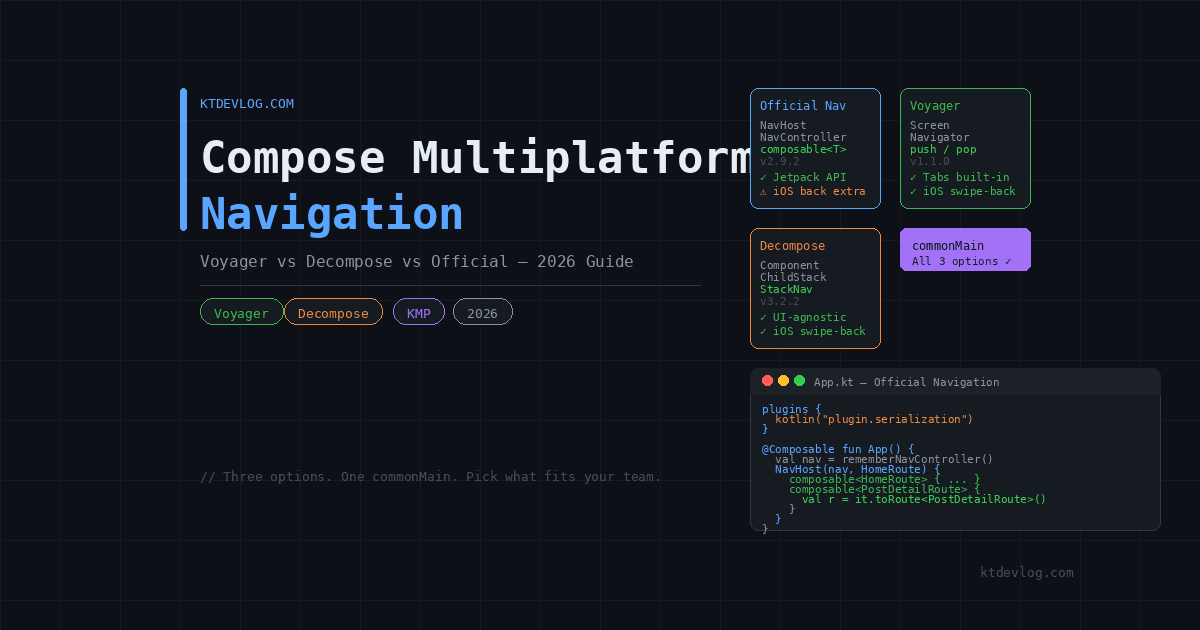
Navigation in Compose Multiplatform has no single right answer — and that’s actually been the conversation in the KMP community for the past two years. Three serious options compete for the same slot in your stack: Voyager, Decompose, and the official JetBrains Navigation library (now at version 2.9.2 in commonMain). Each carries a genuinely different philosophy, and choosing the wrong one for your project type creates painful refactors later.
This guide cuts through the noise. You’ll get honest trade-offs, working code for each approach, and a clear recommendation based on what your project actually needs.




Table of Contents
The Navigation Landscape in 2026
For a long time, Compose Multiplatform had no official navigation story. JetBrains’ own documentation pointed developers toward third-party libraries — Voyager and Decompose being the most recommended. That changed when JetBrains shipped org.jetbrains.androidx.navigation:navigation-compose for commonMain, bringing the familiar Jetpack Compose navigation API to all KMP targets.
Compose Multiplatform 1.10.0, released in January 2026, added Navigation 3 support on non-Android targets alongside stable Compose Hot Reload. The official library is no longer experimental for standard use cases.
So where does that leave Voyager and Decompose? Still very much alive — because each solves navigation differently, and “official” doesn’t automatically mean “best for every team.”
| Official Nav | Voyager | Decompose | |
|---|---|---|---|
Lives in commonMain | ✅ | ✅ | ✅ |
| Familiar Jetpack API | ✅ | ❌ | ❌ |
| Compose-free routing | ❌ | ❌ | ✅ |
| Tab navigation built-in | ❌ | ✅ | ✅ |
| iOS native swipe-back | ⚠️ Extra setup | ✅ | ✅ |
| Learning curve | Low | Low | High |
| UI framework independence | ❌ | ❌ | ✅ |
| Production maturity | Growing | Proven | Proven |
Option 1 — Official JetBrains Navigation Library
If your team already knows Jetpack Compose navigation on Android, this is the fastest path to a working cross-platform router. The API is nearly identical — NavHost, NavController, composable<Route> — zero relearning cost.
Before adding dependencies, make sure the kotlinx.serialization plugin is applied in your shared module. Type-safe routing depends on it — skip this and the @Serializable annotation silently does nothing, causing a runtime crash when the navigation stack tries to parse your route arguments.
// shared/build.gradle.kts
plugins {
    kotlin("plugin.serialization")  // required for type-safe routes
}Now add the navigation dependency to commonMain:
# gradle/libs.versions.toml
[versions]
navigation = "2.9.2"

[libraries]
navigation-compose = { module = "org.jetbrains.androidx.navigation:navigation-compose", version.ref = "navigation" }// shared/build.gradle.kts
kotlin {
sourceSets {
commonMain.dependencies {
implementation(libs.navigation.compose)
}
}
}Define your routes as serializable objects or data classes:
// shared/src/commonMain/kotlin/com/ktdevlog/navigation/Routes.kt

import kotlinx.serialization.Serializable

@Serializable
object HomeRoute

@Serializable
object PostListRoute

@Serializable
data class PostDetailRoute(val postId: Int)Wire the NavHost inside your shared App() composable:
// shared/src/commonMain/kotlin/com/ktdevlog/App.kt

import androidx.navigation.compose.NavHost
import androidx.navigation.compose.composable
import androidx.navigation.compose.rememberNavController

@Composable
fun App() {
    val navController = rememberNavController()

    NavHost(
        navController = navController,
        startDestination = HomeRoute
    ) {
        composable<HomeRoute> {
            HomeScreen(
                onNavigateToPosts = { navController.navigate(PostListRoute) }
            )
        }
        composable<PostListRoute> {
            PostListScreen(
                onPostClick = { id ->
                    navController.navigate(PostDetailRoute(postId = id))
                }
            )
        }
        composable<PostDetailRoute> { backStackEntry ->
            val route = backStackEntry.toRoute<PostDetailRoute>()
            PostDetailScreen(postId = route.postId)
        }
    }
}Clean, readable, and immediately familiar to any Android developer on your team.
The iOS Swipe-Back Reality
Here’s something the official docs quietly gloss over. On Android, the system back button and predictive back gesture work automatically. On iOS, users expect a native swipe-from-left-edge gesture to go back — the same feel they get in every native UIKit app.
The official Navigation library does not wire this up for you on iOS out of the box. You either need a custom UIKit-level gesture recognizer wrapper in your iosMain code, or you reach for a library like Compose Cupertino that patches in native iOS interaction patterns on top of Compose Multiplatform.
Voyager and Decompose both handle iOS swipe-back more naturally without the extra setup — worth factoring in if native feel on iOS matters to your users.
Option 2 — Voyager
Voyager takes a different philosophy entirely. Instead of a central navigation graph, each Screen is self-contained — a class that implements the Screen interface and holds its own UI. Navigation is stack-based, using push and pop to move between screens.
The result feels lighter for simpler apps. No NavHost to configure, no route definitions to maintain separately. You push a new screen onto the stack from inside whichever screen triggers the navigation.
[versions]
voyager = "1.1.0"

[libraries]
voyager-navigator   = { module = "cafe.adriel.voyager:voyager-navigator", version.ref = "voyager" }
voyager-screenmodel = { module = "cafe.adriel.voyager:voyager-screenmodel", version.ref = "voyager" }
voyager-transitions = { module = "cafe.adriel.voyager:voyager-transitions", version.ref = "voyager" }commonMain.dependencies {
implementation(libs.voyager.navigator)
implementation(libs.voyager.screenmodel)
implementation(libs.voyager.transitions)
}Define your screens:
// shared/src/commonMain/kotlin/com/ktdevlog/screens/HomeScreen.kt

import cafe.adriel.voyager.core.screen.Screen
import cafe.adriel.voyager.navigator.LocalNavigator
import cafe.adriel.voyager.navigator.currentOrThrow

class HomeScreen : Screen {

    @Composable
    override fun Content() {
        val navigator = LocalNavigator.currentOrThrow

        Column(
            modifier = Modifier.fillMaxSize(),
            horizontalAlignment = Alignment.CenterHorizontally,
            verticalArrangement = Arrangement.Center
        ) {
            Text("Home Screen")
            Spacer(modifier = Modifier.height(16.dp))
            Button(onClick = { navigator.push(PostListScreen()) }) {
                Text("View Posts")
            }
        }
    }
}Screens that need arguments use a data class:
data class PostDetailScreen(val postId: Int) : Screen {

    @Composable
    override fun Content() {
        val navigator = LocalNavigator.currentOrThrow

        Column(modifier = Modifier.fillMaxSize()) {
            Text("Post Detail — ID: $postId")
            Button(onClick = { navigator.pop() }) {
                Text("Back")
            }
        }
    }
}Wire it at your app root:
@Composable
fun App() {
    Navigator(HomeScreen()) { navigator ->
        SlideTransition(navigator)
    }
}SlideTransition gives you a free slide animation. Voyager ships several built-in transitions — FadeTransition, ScaleTransition, SlideTransition — and they all work cross-platform without configuration.
Tab navigation is equally straightforward with TabNavigator:
@Composable
fun App() {
    TabNavigator(HomeTab) {
        Scaffold(
            bottomBar = {
                NavigationBar {
                    TabNavigationItem(HomeTab)
                    TabNavigationItem(ProfileTab)
                    TabNavigationItem(SettingsTab)
                }
            }
        ) { innerPadding ->
            Box(modifier = Modifier.padding(innerPadding)) {
                CurrentTab()
            }
        }
    }
}Voyager’s biggest trade-off is tight Compose coupling. Navigation logic lives inside the composition tree — you can’t trigger it from a ViewModel or background coroutine cleanly. For straightforward apps that trade is invisible. For complex ones it eventually bites.
Option 3 — Decompose
Decompose is the most architecturally serious option of the three, deliberately so. The core idea: navigation is business logic, not UI logic, so it belongs in commonMain completely decoupled from Compose. Each screen is a Component — a pure Kotlin class that holds its own coroutine scope and doesn’t import a single Compose class.
Swap Compose for SwiftUI, Android Views, or any future UI framework, and your navigation layer survives unchanged. That’s a genuine advantage for long-lived apps.
[versions]
decompose = "3.2.2"

[libraries]
decompose            = { module = "com.arkivanov.decompose:decompose", version.ref = "decompose" }
decompose-extensions = { module = "com.arkivanov.decompose:extensions-compose", version.ref = "decompose" }commonMain.dependencies {
implementation(libs.decompose)
implementation(libs.decompose.extensions)
}Define navigation as a sealed class of child configurations:
// shared/src/commonMain/kotlin/com/ktdevlog/root/RootComponent.kt

import com.arkivanov.decompose.ComponentContext
import com.arkivanov.decompose.router.stack.*
import com.arkivanov.decompose.value.Value
import kotlinx.serialization.Serializable

class RootComponent(
    componentContext: ComponentContext
) : ComponentContext by componentContext {

    private val navigation = StackNavigation<Config>()

    val stack: Value<ChildStack<Config, Child>> =
        childStack(
            source = navigation,
            serializer = Config.serializer(),
            initialConfiguration = Config.Home,
            handleBackButton = true,
            childFactory = ::createChild
        )

    fun navigateToPostList() = navigation.push(Config.PostList)
    fun navigateToDetail(id: Int) = navigation.push(Config.PostDetail(id))
    fun navigateBack() = navigation.pop()

    @Serializable
    sealed class Config {
        @Serializable data object Home : Config()
        @Serializable data object PostList : Config()
        @Serializable data class PostDetail(val postId: Int) : Config()
    }

    sealed class Child {
        class HomeChild(val component: HomeComponent) : Child()
        class PostListChild(val component: PostListComponent) : Child()
        class PostDetailChild(val component: PostDetailComponent) : Child()
    }

    private fun createChild(config: Config, context: ComponentContext): Child =
        when (config) {
            Config.Home          -> Child.HomeChild(HomeComponent(context))
            Config.PostList      -> Child.PostListChild(PostListComponent(context))
            is Config.PostDetail -> Child.PostDetailChild(
                PostDetailComponent(context, config.postId)
            )
        }
}Connect it to Compose in App():
@Composable
fun App(root: RootComponent) {
    Children(stack = root.stack) { child ->
        when (val instance = child.instance) {
            is RootComponent.Child.HomeChild ->
                HomeScreen(component = instance.component)
            is RootComponent.Child.PostListChild ->
                PostListScreen(component = instance.component)
            is RootComponent.Child.PostDetailChild ->
                PostDetailScreen(component = instance.component)
        }
    }
}Navigation calls happen on RootComponent — pure Kotlin, no Compose import. The UI just renders whatever the component tree currently holds. iOS swipe-back works naturally because Decompose ties handleBackButton = true to the platform’s native back mechanism, not Compose’s gesture system.
Voyager vs Decompose vs Official: Which Should You Pick?
Pick the Official Navigation library when your team already knows Jetpack Compose navigation, you want the smallest dependency footprint, and you’re comfortable adding a UIKit wrapper for iOS swipe-back. Best long-term JetBrains support guaranteed.
Pick Voyager when you want something productive fast, your screen flows are straightforward, and you want built-in tab navigation and transitions without extra code. Junior-friendly, low ceremony.
Pick Decompose when navigation must survive UI framework changes, you need navigation logic testable without Compose, or your app is complex enough that architectural purity pays off over time.
Frequently Asked Questions
Can I switch from Voyager to the official navigation library later?
Switching is possible but not trivial. Voyager’s Screen-based model and the NavHost/composable pattern are architecturally different enough that migrating requires rewriting screen wrappers and route definitions. Starting fresh in 2026, the official library is the safer long-term bet for teams already fluent in Jetpack Compose navigation.
Does Decompose work with SwiftUI on iOS?
Yes — this is one of its core strengths. Since Decompose components are pure Kotlin with no Compose dependency, your iOS app can consume RootComponent directly from SwiftUI using StateFlow observation. The same navigation state and back stack runs on both platforms, rendered natively in SwiftUI on iOS and Jetpack Compose on Android.
What is the iOS swipe-back situation with the official navigation library?
Out of the box, the official Navigation library handles Android’s back button and predictive back gesture automatically. iOS swipe-back requires additional setup — either a custom UIKit gesture recognizer in iosMain or a library like Compose Cupertino that patches in native iOS interaction patterns. Voyager and Decompose handle this more naturally without extra configuration, which is worth weighing for apps where native iOS feel is a priority.
What happened to the navigation-compose experimental flag?
As of Compose Multiplatform 1.10.0 in January 2026, the official navigation library moved out of experimental for standard stack navigation. Basic screen routing, type-safe argument passing, and nested graphs are stable across Android and iOS. Deep links and predictive back are still Android-only for now.
Do I need kotlinx.serialization for Voyager or Decompose too?
Decompose uses kotlinx.serialization for its Config sealed class — you’ll need the plugin applied in your shared module. Voyager does not require it for basic navigation, since arguments are passed directly as constructor parameters on data class screens. For the official Navigation library, kotlin("plugin.serialization") is non-negotiable — type-safe routes won’t work without it.
Conclusion
Navigation in Compose Multiplatform is genuinely solved in 2026 — three production-ready options with clear strengths. The official library wins on familiarity and JetBrains backing. Voyager wins on speed and built-in tab support. Decompose wins on architectural purity, UI framework independence, and the smoothest iOS back-navigation story of the three.
Most teams building new KMP apps today reach for the official navigation library first, then hit the iOS swipe-back gap and start evaluating Voyager. That’s a reasonable path. If navigation complexity or long-term UI flexibility matters to your project, Decompose earns a serious look from day one.
With your navigation layer sorted, the next step is wiring your shared ViewModels cleanly to each screen without drilling dependencies through ten layers of composables — the guide on sharing ViewModels across Android and iOS covers exactly that pattern and connects directly with any of the three approaches above.
Pick the tool that fits your team’s brain, not the one with the most GitHub stars.