
You already know Kotlin. You already know Android. You’ve shipped apps, fixed production bugs at midnight, and learned Jetpack Compose the hard way.
Now you’re looking at Kotlin Multiplatform and asking the question every Android developer eventually asks: Is this actually worth learning, or is it another overhyped cross-platform promise that falls apart the moment you try to build something real?
Here’s the honest answer. KMP is not React Native. It’s not Flutter. It doesn’t ask you to abandon Jetpack Compose or learn a new UI toolkit. It doesn’t compile your code to a lowest-common-denominator runtime that feels wrong on both platforms. KMP takes a fundamentally different bet — share the logic, keep the UI native — and in 2026, that bet has paid off at serious scale. Duolingo, McDonald’s, Forbes, Google itself in the Docs app, and hundreds of smaller teams are running KMP in production today.



This is the guide that ties everything together. Every major topic in KMP — project setup, networking, local storage, shared ViewModels, navigation, platform-specific code, library publishing, and migration strategy — has a dedicated deep-dive post on KtDevLog. This pillar guide gives you the full picture, the right learning order, and the context to understand how every piece connects to every other.
Read it end to end if you’re new to KMP. Use it as a reference if you’re mid-build. Either way, by the time you’re done, you’ll know exactly where you are in the KMP landscape and exactly what to do next.
Table of Contents
What Kotlin Multiplatform Actually Is — and What It Isn’t
Before writing a single line of shared code, it helps to be precise about what KMP does.
KMP is a Kotlin compiler feature — not a framework, not a runtime, not a new language. It extends the Kotlin compiler to target multiple platforms from a single codebase. On Android, your shared Kotlin code compiles to JVM bytecode, exactly as always. On iOS, it compiles to native binaries through Kotlin/Native using LLVM. On the web via Kotlin/Wasm, it runs at near-native speed in the browser. Same language, same logic, different compilation targets.
What lives in your shared commonMain module is pure Kotlin — no platform imports, no Android framework references, no UIKit calls. That code is genuinely platform-agnostic. What lives in androidMain and iosMain is platform-specific — Android Context, iOS NSUserDefaults, whatever each platform needs. The expect/actual mechanism bridges these two worlds cleanly, which we’ll come back to shortly.
What KMP is not is write-once-run-everywhere for the UI. It’s write-once-run-everywhere for your logic. The distinction matters enormously. Your networking layer, your database layer, your domain rules, your ViewModels — all of that gets written once. Your Jetpack Compose UI on Android stays Jetpack Compose. Your SwiftUI on iOS stays SwiftUI. Both platforms get exactly the native experience their users expect, powered by the same shared business logic underneath.
As of 2026, Kotlin Multiplatform is officially stable and production-ready, supported by both JetBrains and Google for the Android/iOS use case. The “experimental” warning is gone. The API is stable. Teams can adopt it without hedging.
The KMP Architecture: How the Layers Fit Together
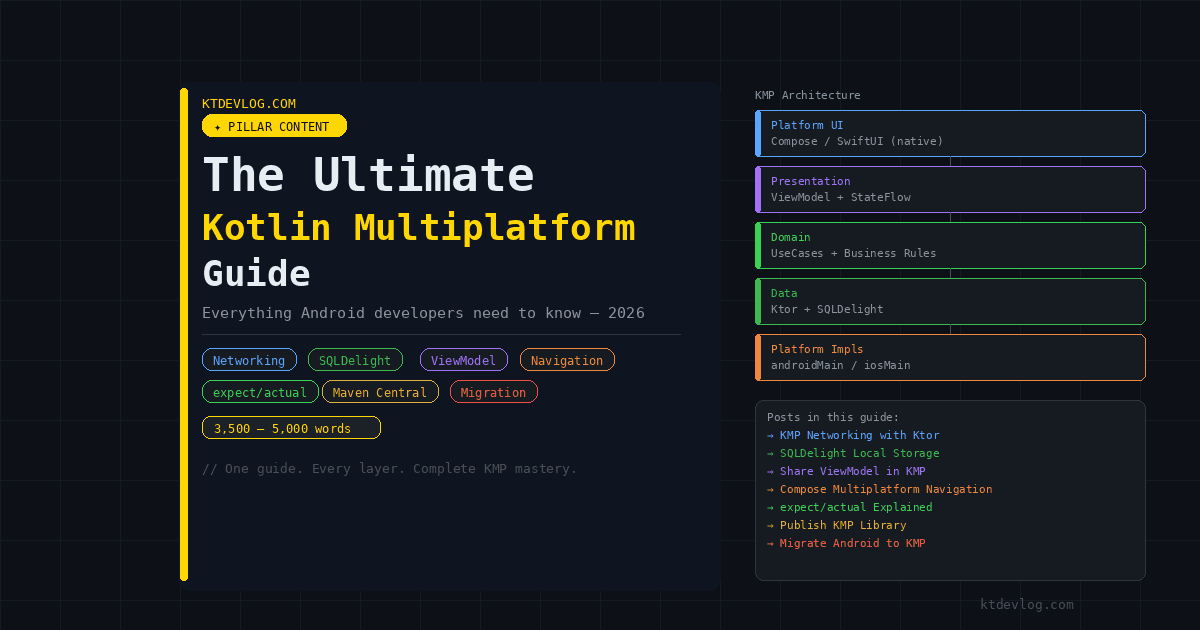
Every well-built KMP app follows the same layered architecture. Understanding this structure before writing code saves you from making decisions that are hard to undo later.
┌─────────────────────────────────────────────────┐
│               Platform UI Layer                  │
│    Jetpack Compose (Android)  SwiftUI (iOS)      │
├─────────────────────────────────────────────────┤
│           Presentation Layer (commonMain)         │
│         ViewModel + StateFlow<UiState>           │
├─────────────────────────────────────────────────┤
│             Domain Layer (commonMain)             │
│              UseCases + Business Rules           │
├─────────────────────────────────────────────────┤
│              Data Layer (commonMain)              │
│        Repository + Ktor + SQLDelight            │
├─────────────────────────────────────────────────┤
│         Platform Implementations                 │
│    androidMain (drivers, engines, sensors)       │
│    iosMain (drivers, engines, sensors)           │
└─────────────────────────────────────────────────┘
Everything from the data layer upward through the presentation layer lives in commonMain. The platform UI layer stays native. The platform implementations in androidMain and iosMain are thin — they provide the platform-specific drivers and engines that the shared code relies on through expect/actual, but they contain no business logic themselves.
This architecture means roughly 70-85% of your total codebase is shared. The remaining 15-30% is genuinely platform-specific UI and thin platform adapters. That ratio is why KMP is compelling — it’s not theoretical code sharing, it’s the actual business logic that drives your app.
Setting Up Your First KMP Project
Getting your environment right the first time matters. A misconfigured KMP project produces confusing errors that send developers down the wrong troubleshooting paths.
What you need:
- Android Studio Meerkat or later (2024.2.1+)
- Kotlin plugin updated to the latest version from Android Studio preferences
- Xcode 15+ installed on macOS if you’re targeting iOS
- The KMP plugin for Android Studio (available in the plugin marketplace)
Once Android Studio is ready, create a new project and select the Kotlin Multiplatform App template. This generates the standard project structure:
myApp/
├── shared/
│   ├── src/
│   │   ├── commonMain/kotlin/     ← your shared code lives here
│   │   ├── androidMain/kotlin/    ← Android-specific implementations
│   │   └── iosMain/kotlin/        ← iOS-specific implementations
│   └── build.gradle.kts
├── androidApp/                    ← your Android Jetpack Compose app
│   └── build.gradle.kts
└── iosApp/                        ← your iOS SwiftUI app (Xcode project)
The shared module is the heart of everything. androidApp imports it as a Gradle dependency. iosApp consumes it as an .xcframework built by the Kotlin/Native compiler.
One thing the template doesn’t make obvious: your Gradle version catalog in gradle/libs.versions.toml becomes extremely important in KMP projects. Every KMP library — Ktor, SQLDelight, lifecycle-viewmodel — needs precise version coordination. Using the version catalog keeps this manageable as the dependency count grows.
The expect/actual Mechanism: KMP’s Platform Bridge
Before diving into specific libraries, you need to understand expect/actual. It’s the mechanism everything else in KMP is built on — the database driver, the HTTP engine, the ViewModel scope on iOS, all of it.
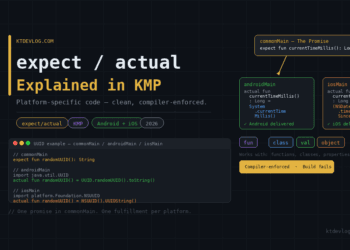
The concept is a compiler-enforced contract. In commonMain, you declare what you need using the expect keyword, without any implementation. In androidMain and iosMain, you fulfill that promise with actual implementations that use real platform APIs.
// commonMain — the promise
expect fun currentTimeMillis(): Long

// androidMain — Android delivers
actual fun currentTimeMillis(): Long = System.currentTimeMillis()

// iosMain — iOS delivers
actual fun currentTimeMillis(): Long =
(NSDate().timeIntervalSince1970 * 1000).toLong()The Kotlin compiler enforces this contract at build time. If any expect declaration is missing an actual in any target, the build fails immediately — you cannot ship a broken implementation by accident.
This pattern is what makes the SQLDelight database driver setup work, why Ktor can use OkHttp on Android and the Darwin network stack on iOS, and how ViewModels get properly scoped on both platforms. Every time you see expect/actual in KMP code, you’re seeing this same promise/delivery pattern at work.
The complete deep-dive into every form this pattern takes — functions, classes, properties, real-world examples — is in the KMP expect/actual explained guide.
Networking: Ktor Replaces Retrofit in commonMain
The first thing every KMP app needs after project setup is networking. And the first question every Android developer asks is: can I keep using Retrofit?
The short answer is no — not in commonMain. Retrofit depends on Java reflection and OkHttp, neither of which runs on iOS. You can keep Retrofit in androidMain for Android-specific code, but then you’re writing networking logic twice, which defeats the purpose of KMP entirely.
The correct tool is Ktor — JetBrains’ async HTTP client built from the ground up for Kotlin Multiplatform. Ktor uses a platform-native engine on each target (OkHttp on Android, the Darwin NSURLSession-based engine on iOS) under one shared API. You write your HttpClient configuration once in commonMain, and Ktor handles the platform differences internally.
// commonMain — your entire HTTP client, shared
fun createHttpClient(): HttpClient = HttpClient {
    install(ContentNegotiation) {
        json(Json { ignoreUnknownKeys = true })
    }
    install(Logging) {
        level = LogLevel.HEADERS
    }
}Your repositories call this client with suspend functions, get back deserialized Kotlin data classes, and neither the repository nor its caller has any idea whether they’re running on Android or iOS.
Everything about Ktor setup — dependencies, the expect/actual engine pattern, error handling, and connecting to a ViewModel — is covered step by step in the KMP networking with Ktor guide.
Local Storage: SQLDelight Replaces Room in commonMain
Networking handles server data. SQLDelight handles local data. Together, they give you a complete offline-first data layer entirely in commonMain.
Room doesn’t work in commonMain for the same reason Retrofit doesn’t — it depends on Android-specific annotation processing and the Context system. SQLDelight was built specifically for Kotlin Multiplatform. It generates type-safe Kotlin APIs from plain SQL files, validates every query at compile time, and runs natively on Android and iOS through the same expect/actual driver pattern.
The mental shift from Room to SQLDelight is worth understanding before you start. Room generates code from annotations — you describe your schema in Kotlin. SQLDelight generates code from .sq files — you write actual SQL and SQLDelight generates the Kotlin. The generated API is type-safe and compile-time-validated, which means renamed columns and changed queries produce build errors, not runtime crashes.
-- Note.sq in commonMain/sqldelight/
CREATE TABLE Note (
    id        INTEGER NOT NULL PRIMARY KEY AUTOINCREMENT,
    title     TEXT    NOT NULL,
    body      TEXT    NOT NULL,
    createdAt INTEGER NOT NULL
);

getAllNotes:
SELECT * FROM Note ORDER BY createdAt DESC;SQLDelight reads this file and generates a NoteQueries class with a getAllNotes() function that returns a Kotlin Flow — reactive, type-safe, and platform-agnostic.
The complete setup including the DatabaseDriverFactory expect/actual pattern, reactive queries with Flow, and repository implementation lives in the KMP local storage with SQLDelight guide.
Shared ViewModels: One Presentation Layer for Both Platforms
With data and networking in commonMain, the natural question is whether ViewModels can live there too. In 2026, the answer is yes — cleanly and officially.
The AndroidX Lifecycle ViewModel class is available in commonMain from version 2.9.0. Google announced official KMP support for this library in May 2025, and it’s been stable since. That means viewModelScope, StateFlow, MutableStateFlow, all of it — available in shared code, no third-party library required for the ViewModel itself.
// commonMain — presentation logic shared across Android and iOS
class PostViewModel(
    private val repository: PostRepository
) : ViewModel() {

    private val _uiState = MutableStateFlow(PostUiState())
    val uiState: StateFlow<PostUiState> = _uiState.asStateFlow()

    fun loadPosts() {
        viewModelScope.launch {
            _uiState.update { it.copy(isLoading = true) }
            try {
                val posts = repository.getPosts()
                _uiState.update { it.copy(posts = posts, isLoading = false) }
            } catch (e: Exception) {
                _uiState.update { it.copy(errorMessage = e.message, isLoading = false) }
            }
        }
    }
}On Android, collectAsStateWithLifecycle() in Jetpack Compose observes this directly. On iOS, a Swift wrapper using SKIE bridges the StateFlow to SwiftUI’s @Published system. The business logic — what data to fetch, when to show errors, how to handle loading states — is written once and shared.
The full shared ViewModel setup including the SKIE plugin for iOS Flow bridging and the Swift wrapper pattern is in the guide to sharing ViewModels across Android and iOS.
Navigation: Routing Across Screens in commonMain
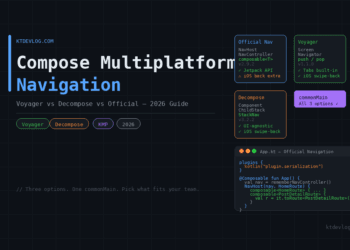
Once you have data, storage, and ViewModels in shared code, navigation is the last major architectural piece. In 2026, you have three production-ready options.
The official JetBrains Navigation library (org.jetbrains.androidx.navigation:navigation-compose) brings the familiar NavHost/NavController/composable<Route> API from Jetpack Compose to commonMain. It’s the lowest-friction option for teams already fluent in Jetpack navigation — the API is nearly identical.
Voyager takes a stack-based approach where each Screen is a self-contained class. Push screens onto the stack, pop them off. Tab navigation is built in. Screen transitions come for free. Great for teams that want to move fast without learning a new navigation paradigm.
Decompose treats navigation as business logic — completely decoupled from Compose. Your navigation state lives in a pure Kotlin RootComponent that can drive both Jetpack Compose and SwiftUI without importing either. The steepest learning curve of the three, but the cleanest architecture for complex apps.
One critical point the official Navigation library documentation downplays: iOS swipe-to-go-back requires extra setup (a UIKit gesture recognizer wrapper) with the official library, whereas Voyager and Decompose handle it natively. Worth factoring in before committing.
The full comparison with working code for all three libraries is in the Compose Multiplatform navigation guide.
Compose Multiplatform: Sharing UI Too (When You Want To)
KMP and Compose Multiplatform are separate decisions. You can use KMP for business logic sharing while keeping native UI on each platform — and that’s a completely valid, production-proven architecture.
But when you’re ready to share UI as well, Compose Multiplatform extends Jetpack Compose to run on iOS, desktop, and web. The same @Composable functions you write on Android render natively on iOS through a Kotlin/Native Compose runtime. The same LazyColumn, Button, TextField — all of it works cross-platform.
The practical reality in 2026 is that most teams sharing UI with Compose Multiplatform keep platform-specific screens for anything requiring deeply native behavior — camera, maps, biometrics — and use shared Compose UI for the majority of their app’s screens. A hybrid approach, exactly like KMP itself encourages.
Compose Multiplatform setup, component architecture, and building your first shared screen are covered in the Compose Multiplatform tutorial.
KMP vs Flutter: The Question Every Team Asks
At some point in every KMP evaluation, someone in the room asks: “Why not just use Flutter?”
It’s a fair question. Flutter is mature, has a massive ecosystem, and ships beautiful cross-platform UIs. But the trade-offs are real and specific.
Flutter requires writing Dart. Your existing Kotlin codebase and your iOS team’s Swift knowledge don’t transfer — everyone learns a new language. Flutter’s “native” UI is actually a custom rendering engine drawing pixels directly to the screen, bypassing platform UI components entirely. That gives consistency across platforms but means you’re not getting the actual native components users are familiar with.
KMP takes the opposite bet. Your Kotlin skills transfer directly. Your Android architecture patterns transfer. Your existing libraries transfer (those with KMP support). And the UI stays genuinely native on each platform — actual UIKit components on iOS, actual Material components on Android.
The honest answer for most teams is: if you’re an Android team already writing Kotlin, KMP has dramatically lower adoption cost. If you’re a mixed team starting from scratch with no existing codebase, Flutter’s tooling maturity is a real advantage. The Kotlin Multiplatform vs Flutter 2026 comparison breaks this down with specifics across team size, project type, and platform requirements.
Migrating an Existing Android App to KMP
Most developers reading this don’t have the luxury of starting a new KMP project from scratch. You have a running Android app with real users, and you want to add iOS without rewriting everything.
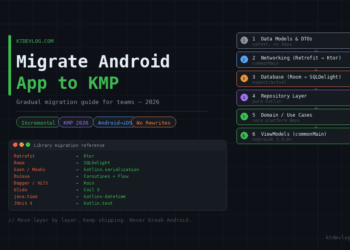
The good news: KMP was designed for incremental adoption. You don’t migrate everything at once. You migrate layer by layer, keeping the Android app shipping throughout the entire process.
The order matters:
- Data models — zero dependencies, safest first move
- Networking — Ktor replaces Retrofit in
commonMain - Local database — SQLDelight replaces Room
- Repository layer — follows naturally once 2 and 3 are done
- Domain/use cases — pure Kotlin, moves almost automatically
- ViewModels — AndroidX 2.9.0+ makes this clean
- UI — optional, Compose Multiplatform when and if you want it
The critical library swap table:
| Android Library | KMP Replacement |
|---|---|
| Retrofit | Ktor |
| Room | SQLDelight |
| Gson / Moshi | kotlinx.serialization |
| RxJava | Coroutines + Flow |
| Dagger / Hilt | Koin |
| java.time | kotlinx-datetime |
One genuine prerequisite: if your codebase is still using RxJava, migrate to coroutines on Android before starting the KMP migration. RxJava has no path into commonMain — coroutines do.
The complete migration playbook including Gradle setup for AGP 9.x, the modularization audit, and a realistic timeline is in the guide to migrating Android apps to Kotlin Multiplatform.
Publishing Your KMP Library to Maven Central
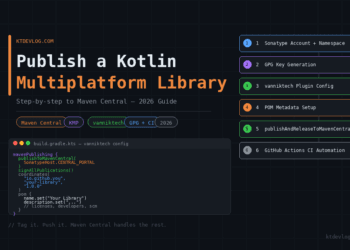
Once you’ve built shared modules that work well in your own project, the natural next step is sharing them with the wider Kotlin community. Publishing a KMP library to Maven Central in 2026 is significantly smoother than it was two years ago — the Sonatype Central Portal replaced the old JIRA-based process, and the vanniktech Gradle plugin handles most of the ceremony automatically.
The essentials:
- Register on central.sonatype.com and verify a namespace
- Generate a GPG key pair for artifact signing
- Configure
com.vanniktech.maven.publishin your library module - Provide POM metadata — Maven Central rejects anything missing
name,description,url,licenses,developers, andscm - Automate with GitHub Actions using
macos-latestrunners (required for iOS target compilation)
One trip wire that catches almost everyone: your GitHub Actions workflow must use a macos-latest runner for libraries with iOS targets. Linux runners cannot compile Kotlin/Native iOS binaries — the build fails silently without a useful error message.
The complete step-by-step process including the full GitHub Actions workflow YAML, credential setup, and common error fixes is in the guide to publishing a Kotlin Multiplatform library.
The KMP Learning Roadmap: What to Build in What Order
Theory is only useful if it connects to practice. Here’s the concrete sequence for an Android developer going from zero to a production-ready KMP app:
Week 1 — Foundation Set up your KMP project. Get Android and iOS targets compiling. Write your first expect/actual function. Understand the source set structure. Read the KMP expect/actual guide.
Week 2 — Data Layer Replace Retrofit with Ktor. Write your first commonMain repository with suspend functions. Verify it works on Android. Set up SQLDelight for local storage. Have an offline-first data layer in commonMain by end of week. Start with KMP networking with Ktor then move to SQLDelight setup.
Week 3 — Presentation Layer Move your ViewModels to commonMain using AndroidX 2.9.0+. Set up SKIE for iOS Flow bridging. Connect ViewModels to Jetpack Compose on Android. Wire up the Swift wrapper for iOS. The shared ViewModel guide is your reference here.
Week 4 — Navigation and UI Pick a navigation library. Implement screen routing in commonMain. Optionally start sharing UI with Compose Multiplatform. The navigation guide covers all three library options with working code.
Ongoing — Polish and Ship Add proper error handling, loading states, and offline behavior. Write tests in commonTest. When you’re ready, consider sharing your utilities as a KMP library on Maven Central.
Common Mistakes That Slow Teams Down
In my experience watching teams adopt KMP, the same mistakes surface repeatedly. Knowing them in advance saves real time.
Trying to migrate everything at once. The teams that struggle most are the ones that freeze feature development for six weeks to do a full migration. The teams that succeed migrate one layer per sprint while shipping features normally.
Keeping RxJava in the codebase. RxJava cannot go into commonMain. Period. Teams that skip the coroutines migration before starting KMP pay for it heavily. Migrate RxJava to coroutines on Android first, then KMP becomes much more straightforward.
Ignoring the iOS build early. It’s tempting to develop the shared module on Android only and “deal with iOS later.” In practice, iOS-specific compilation errors — missing actual implementations, Kotlin/Native memory model issues, SKIE bridge problems — are much harder to debug when you’ve accumulated fifty uncommitted changes. Build and test the iOS target from day one, even if there’s no iOS UI yet.
Using Linux CI runners for iOS targets. Kotlin/Native iOS compilation requires macOS. If your GitHub Actions workflow uses ubuntu-latest for a library with iOS targets, the build will fail every time. Switch to macos-latest before this becomes a blocker.
Skipping the ignoreUnknownKeys = true config in Ktor. APIs add fields. Without this setting, new server fields crash your app on both platforms. Set it once in your HttpClient configuration and never think about it again.
Frequently Asked Questions
Is Kotlin Multiplatform production-ready in 2026?
Yes — fully. KMP hit stable status with official Google support for the Android/iOS use case. Companies including McDonald’s, Duolingo, Forbes, and Netflix run KMP in production at scale. The “experimental” label is gone, the API is stable, and the tooling in Android Studio is first-class. The risk of adoption is as low as it has ever been.
Do I need to learn Swift to use KMP?
Not to write KMP code — all shared logic is Kotlin. You’ll need a basic understanding of Swift to write the iOS UI layer in SwiftUI and to set up the Swift wrapper for consuming shared ViewModels. But “basic Swift for UI consumption” is a much lower bar than “writing iOS business logic in Swift from scratch.” Most Android developers get comfortable with the iOS side of KMP within a few weeks.
How much of my app can I actually share with KMP?
In practice, 70-85% is achievable for most apps — all networking, storage, domain logic, and ViewModels in commonMain, with native UI on each platform. Teams using Compose Multiplatform for UI sharing report 90%+ code reuse. The exact number depends on how much of your app relies on platform-specific APIs (camera, sensors, notifications) that require expect/actual wrappers.
Can KMP and Flutter be used together?
Not meaningfully — they solve the same problem with incompatible approaches. Flutter owns the entire rendering stack; KMP shares Kotlin logic for native UIs. Picking one is a genuine architectural decision, not a matter of combining both. The detailed comparison is in the KMP vs Flutter 2026 guide.
What’s the difference between KMP and Compose Multiplatform?
KMP is the Kotlin compiler feature that enables sharing code across platforms — it handles your data layer, networking, ViewModels, and business logic. Compose Multiplatform is a separate JetBrains project that extends Jetpack Compose to run on non-Android targets. You can use KMP without Compose Multiplatform (keep native UI per platform) or use them together (share UI too). Most teams start with KMP for logic sharing and consider Compose Multiplatform for UI later.
Conclusion
Kotlin Multiplatform in 2026 is the most practical cross-platform story available to Android developers. You keep Kotlin. You keep Jetpack Compose. You keep your architecture patterns. You just move the logic that doesn’t need to be platform-specific — which turns out to be most of your app — into a shared module that iOS consumes natively.
The learning path is clear. The tools are stable. The production track record is real. What used to require hedging and asterisks now just requires time and the right guide.
Every section in this pillar links to a dedicated post with full code, working examples, and the honest trade-offs for each decision. Use them as a complete curriculum or jump directly to whatever piece you’re building right now.
Start where you are. Migrate layer by layer. Keep shipping.
You already write Kotlin. You’re more prepared for KMP than you think.