
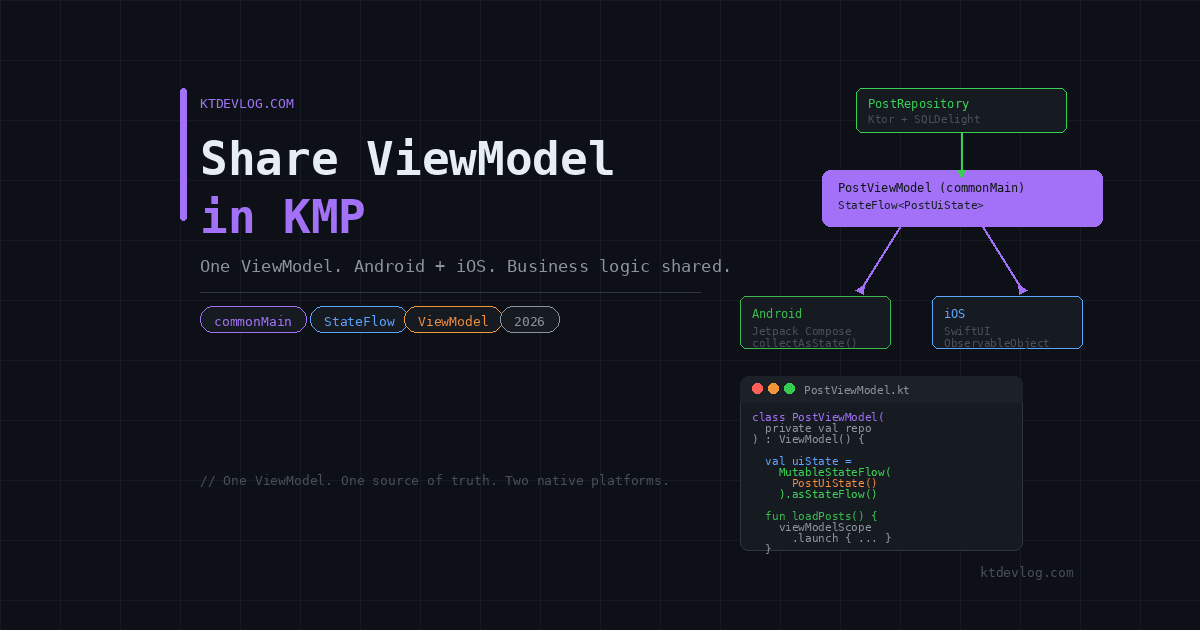

You’ve shared your networking layer with Ktor. Your local database runs on SQLDelight. Both live in commonMain — clean, shared, and working beautifully.
Then you hit the presentation layer. And suddenly everything gets complicated.
Your ViewModel holds loading states, error states, user data, and all the business logic that drives your UI. On Android, Jetpack’s ViewModel handles lifecycle automatically. On iOS, SwiftUI uses ObservableObject. These two systems don’t speak the same language — and that’s where most KMP developers get stuck.




Here’s the good news: in 2026, sharing your ViewModel in KMP is not just possible — it’s the industry standard. Google officially supports it. The AndroidX Lifecycle library now compiles for commonMain. And the pattern is clean enough that Netflix, Cash App, and McDonald’s run it in production at scale.
This guide shows you exactly how to do it — step by step, with real code you can drop straight into your project.
Table of Contents
Why Share Your ViewModel in KMP at All
Before writing a single line, it’s worth understanding what you actually gain — because some developers still put their ViewModels in platform code and write the same loading/error/success logic twice.
Think about what lives inside a typical ViewModel. Data fetching calls. Loading state management. Error handling. Input validation. Business rules. Navigation triggers. All of that logic is completely platform-independent. It doesn’t care whether the UI is built with Jetpack Compose or SwiftUI. It just manages state and reacts to events.
Writing that logic twice means two places to fix bugs. Two places to test. Two places where Android and iOS quietly drift apart in behaviour. Shared ViewModels eliminate that drift entirely.
In 2026, the AndroidX Lifecycle ViewModel class is available directly in commonMain starting from version 2.9.0 — no third-party libraries required for most use cases. You write one ViewModel, one set of StateFlow properties, one business logic layer — and both platforms consume it natively.
The result: up to 85% of your presentation logic shared, with each platform’s UI layer remaining 100% native.
Step 1 — Add the Lifecycle ViewModel Dependency
Open your gradle/libs.versions.toml and add the multiplatform lifecycle dependency:
[versions]
lifecycle = "2.9.0"

[libraries]
lifecycle-viewmodel         = { module = "org.jetbrains.androidx.lifecycle:lifecycle-viewmodel", version.ref = "lifecycle" }
lifecycle-viewmodel-compose = { module = "org.jetbrains.androidx.lifecycle:lifecycle-viewmodel-compose", version.ref = "lifecycle" }Now add it to your shared module’s build.gradle.kts:
kotlin {
    sourceSets {
        commonMain.dependencies {
            implementation(libs.lifecycle.viewmodel)
            implementation(libs.lifecycle.viewmodel.compose)
        }
    }
}That’s it. No androidMain. No iosMain. The entire ViewModel class — including viewModelScope — is now available in commonMain and compiles for both Android and iOS targets.
Sync Gradle. Once it builds clean, you’re ready to write your first shared ViewModel.
Step 2 — Write a Shared ViewModel in commonMain
Your shared ViewModel looks almost identical to an Android-only ViewModel. That’s the point. The API is the same. The mental model is the same. The only difference is where the file lives — commonMain instead of androidMain.
// shared/src/commonMain/kotlin/com/ktdevlog/viewmodel/PostViewModel.kt

import androidx.lifecycle.ViewModel
import androidx.lifecycle.viewModelScope
import kotlinx.coroutines.flow.MutableStateFlow
import kotlinx.coroutines.flow.StateFlow
import kotlinx.coroutines.flow.asStateFlow
import kotlinx.coroutines.flow.update
import kotlinx.coroutines.launch

data class PostUiState(
    val posts: List<Post> = emptyList(),
    val isLoading: Boolean = false,
    val errorMessage: String? = null
)

class PostViewModel(
    private val repository: PostRepository
) : ViewModel() {

    private val _uiState = MutableStateFlow(PostUiState())
    val uiState: StateFlow<PostUiState> = _uiState.asStateFlow()

    init {
        loadPosts()
    }

    fun loadPosts() {
        viewModelScope.launch {
            _uiState.update { it.copy(isLoading = true, errorMessage = null) }
            try {
                val posts = repository.getPosts()
                _uiState.update { it.copy(posts = posts, isLoading = false) }
            } catch (e: Exception) {
                _uiState.update {
                    it.copy(
                        isLoading = false,
                        errorMessage = e.message ?: "Something went wrong"
                    )
                }
            }
        }
    }

    fun retry() { loadPosts() }
}viewModelScope is fully available in commonMain — lifecycle-aware on Android, manually cleared on iOS via clear(). The single PostUiState data class pattern keeps state management clean and testable across both platforms.
Step 3 — Consuming the Shared ViewModel on Android
Before using collectAsStateWithLifecycle(), add this dependency to your Android app module’s build.gradle.kts — it won’t resolve without it:
// androidApp/build.gradle.kts
dependencies {
    implementation("androidx.lifecycle:lifecycle-runtime-compose:2.9.0")
}Without this, Android Studio throws an Unresolved reference: collectAsStateWithLifecycle error. One line — problem solved. Now the screen composable works cleanly:
// androidApp/src/main/kotlin/com/ktdevlog/PostScreen.kt

import androidx.lifecycle.compose.collectAsStateWithLifecycle
import androidx.lifecycle.viewmodel.compose.viewModel

@Composable
fun PostScreen(
    viewModel: PostViewModel = viewModel {
        PostViewModel(repository = PostRepository(createHttpClient()))
    }
) {
    val uiState by viewModel.uiState.collectAsStateWithLifecycle()

    when {
        uiState.isLoading -> CircularProgressIndicator()
        uiState.errorMessage != null -> {
            Column {
                Text("Error: ${uiState.errorMessage}")
                Button(onClick = { viewModel.retry() }) { Text("Retry") }
            }
        }
        else -> {
            LazyColumn {
                items(uiState.posts) { post -> PostItem(post = post) }
            }
        }
    }
}Use collectAsStateWithLifecycle() — not plain collectAsState(). It stops collecting when the composable isn’t visible, saving battery and preventing unnecessary background work.
Step 4 — Before You Write the iOS Wrapper: Add SKIE
Here’s the part most KMP tutorials get wrong — and the reason iOS builds fail with a cryptic Xcode error.
Kotlin’s StateFlow is exposed to Swift as a generic Objective-C object. It is not a Swift AsyncSequence by default. The for await state in viewModel.uiState syntax will not compile in Xcode without extra setup — regardless of what other guides tell you.
In 2026, the gold standard solution is SKIE — the Swift/Kotlin Interface Enhancer by Touchlab. It’s a Kotlin compiler plugin that automatically transforms Kotlin Flows, sealed classes, and enums into their native Swift equivalents. With SKIE, your StateFlow becomes a real Swift AsyncSequence and the for await syntax compiles cleanly.
Add SKIE to your project:
# gradle/libs.versions.toml
[versions]
skie = "0.9.1"

[plugins]
skie = { id = "co.touchlab.skie", version.ref = "skie" }// shared/build.gradle.kts
plugins {
alias(libs.plugins.skie)
}No configuration needed beyond this. Run a clean build. SKIE handles the rest at compile time.
No SKIE? Use the callback approach instead:
// Add to PostViewModel in commonMain
fun observeUiState(onState: (PostUiState) -> Unit): Job {
    return CoroutineScope(Dispatchers.Main).launch {
        uiState.collect { state -> onState(state) }
    }
}SKIE is cleaner and eliminates boilerplate. Use it for any new project.
Step 5 — Consuming the Shared ViewModel on iOS (with SKIE)
With SKIE installed, create a Swift wrapper that bridges your shared ViewModel to SwiftUI’s observation system:
// iosApp/PostViewModel+Swift.swift

import SwiftUI
import shared

@MainActor
class PostViewModelWrapper: ObservableObject {

    private let viewModel: PostViewModel

    @Published var uiState: PostUiState = PostUiState(
        posts: [],
        isLoading: false,
        errorMessage: nil
    )

    init() {
        self.viewModel = PostViewModel(
            repository: PostRepository(
                httpClient: HttpClientFactory().createHttpClient()
            )
        )
        observeState()
    }

    private func observeState() {
        // Works cleanly because SKIE converts StateFlow → AsyncSequence
        Task {
            for await state in viewModel.uiState {
                self.uiState = state
            }
        }
    }

    func retry() { viewModel.retry() }

    deinit { viewModel.clear() } // ← Critical: cancels viewModelScope on iOS
}
// iosApp/PostView.swift
struct PostView: View {
@StateObject private var wrapper = PostViewModelWrapper()
var body: some View {
Group {
if wrapper.uiState.isLoading {
ProgressView()
} else if let error = wrapper.uiState.errorMessage {
VStack {
Text("Error: \(error)")
Button("Retry") { wrapper.retry() }
}
} else {
List(wrapper.uiState.posts, id: \.id) { post in
PostRowView(post: post)
}
}
}
.navigationTitle("Posts")
}
}Always call viewModel.clear() in deinit. This cancels viewModelScope on iOS and prevents memory leaks. On Android, the lifecycle manages this automatically — on iOS, deinit is your cleanup gate.
Step 6 — Structuring Your Business Logic Layer
The ViewModel is the presentation layer. Business rules belong one layer deeper — in a UseCase:
// shared/src/commonMain/kotlin/com/ktdevlog/domain/GetPostsUseCase.kt

class GetPostsUseCase(private val repository: PostRepository) {

    suspend operator fun invoke(): List<Post> {
        return repository.getPosts()
            .filter { it.title.isNotBlank() }
            .sortedByDescending { it.id }
    }
}Your ViewModel calls the use case, not the repository directly. Business logic is written once, tested once, shared across both platforms.
KMP Architecture Layers: Shared vs Native
Understanding which layers belong in commonMain versus platform code is the decision that determines how much code you actually share. Here’s the breakdown:
| Layer | Lives In | Shared? |
|---|---|---|
| Business rules / UseCases | commonMain | ✅ 100% shared |
| ViewModel + StateFlow state | commonMain | ✅ 100% shared |
| Repository + data models | commonMain | ✅ 100% shared |
| Networking (Ktor) | commonMain | ✅ 100% shared |
| Local DB (SQLDelight) | commonMain | ✅ 100% shared |
| Jetpack Compose UI | androidMain | ❌ Android only |
| SwiftUI views | iosApp | ❌ iOS only |
| Swift ViewModel wrapper | iosApp | ❌ iOS bridge only |
| SKIE Flow bridging | Compile-time | ✅ Auto-generated |
Frequently Asked Questions
Is it safe to use androidx.lifecycle.ViewModel in commonMain in 2026?
Yes — fully safe and officially recommended. Google announced KMP support for AndroidX Lifecycle starting with version 2.9.0 in May 2025. As of 2026, it’s stable and production-ready with no experimental flags needed.
Do I need a third-party library like KMM-ViewModel to share ViewModels in 2026?
Not for the ViewModel itself — the official AndroidX library handles that now. However, you do need SKIE (or KMP-NativeCoroutines) to properly bridge Kotlin Flows to Swift. That part is still a required step for iOS interop and can’t be skipped.
What is SKIE and why is it needed for iOS?
SKIE is a Kotlin compiler plugin by Touchlab that automatically converts Kotlin-native types — Flows, sealed classes, enums — into their proper Swift equivalents at compile time. Without it, StateFlow is just an Objective-C object in Swift, not an AsyncSequence, and the for await syntax fails to compile. With SKIE, iOS interop becomes first-class.
How does viewModelScope work on iOS since there’s no Android lifecycle?
On iOS, viewModelScope is backed by a CoroutineScope tied to Dispatchers.Main. It has no automatic lifecycle awareness — that concept doesn’t exist on iOS. You manage cleanup manually: call viewModel.clear() in your Swift wrapper’s deinit to cancel all running coroutines. Think of clear() as iOS’s equivalent of Android’s automatic onCleared().
Can I use Koin for dependency injection with shared ViewModels in KMP?
Yes — and it’s the recommended approach for production apps. Koin supports KMP natively and integrates directly with the shared ViewModel pattern. Define your ViewModel in a Koin module in commonMain, inject it on Android with koinViewModel(), and provide it to the Swift wrapper via the Koin container on iOS.
Conclusion
Two years ago, sharing ViewModels in KMP required workarounds and careful lifecycle management on both platforms. In 2026, the official AndroidX ViewModel compiles in commonMain, viewModelScope works out of the box, and SKIE makes iOS Flow bridging seamless.
The architecture is clean: one ViewModel in commonMain, one StateFlow<UiState> exposed to both platforms, native UI on each side consuming the same shared source of truth. Business logic written once. Bugs fixed once. Tests written once.
If you haven’t set up your shared networking and local database layers yet, the KMP networking with Ktor guide and the SQLDelight local storage setup cover those foundations — your shared ViewModel builds directly on top of both.
Write the logic once. Let each platform render it beautifully.

Comments 1