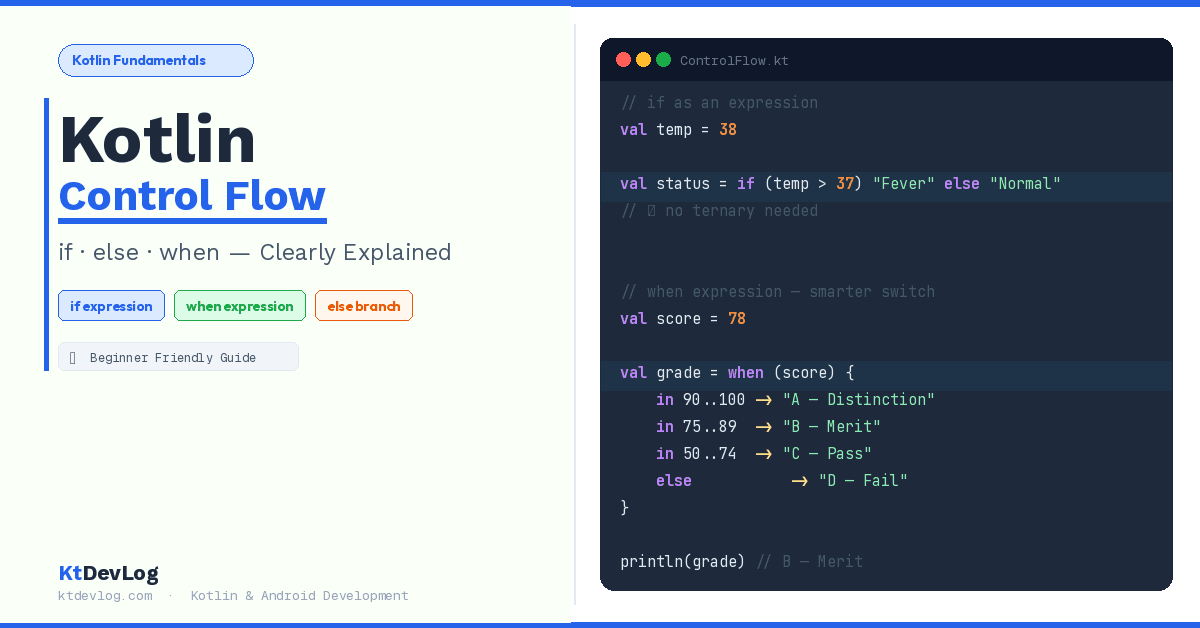

Every program you’ll ever write needs to make decisions. Should this button be enabled or disabled? Is this user logged in? Is this number positive, negative, or zero?
That’s Kotlin control flow at work — and it’s the foundation of every Android app you’ll build.
Here’s what makes Kotlin interesting right from the start: if and when aren’t just statements in Kotlin. They’re expressions — meaning they can return values and be assigned directly to variables. If you’re coming from Java, that’s going to feel like a small superpower once it clicks.
In this guide, I’ll walk you through everything you need to know about Kotlin control flow — if, else, else if, and the powerful when expression. You’ll see real examples, understand the thinking behind the syntax, and finish with patterns you’ll use every single day as an Android developer.
Table of Contents
What Is Kotlin Control Flow?
Kotlin control flow refers to the set of expressions and statements that control which code runs and when. Instead of executing every line top to bottom, your program branches, skips, or repeats based on conditions.
According to the official Kotlin documentation, Kotlin provides if, when, for, and while as its core control flow tools. In this guide, we’re focusing on the decision-making ones — if, else, and when — because these are what you’ll reach for most often when building Android apps.
Let’s start from the very beginning.
Kotlin if Expression — The Basics
The if expression in Kotlin works exactly like you’d expect from any programming language. You give it a condition, and it runs a block of code if that condition is true.
fun main() {
    val temperature = 38

    if (temperature > 37) {
        println("You have a fever. Rest up.")
    }
}

// Output:
You have a fever. Rest up.Simple. Clean. But here’s where Kotlin immediately differs from Java and most other languages.
if as an Expression — Returns a Value
In Kotlin, if is an expression, not just a statement. That means it can return a value and be assigned directly to a variable. This completely removes the need for a ternary operator — which is why Kotlin doesn’t have one.
In Java, you’d write something like this:
// Java ternary operator
String label = temperature > 37 ? "Fever" : "Normal";In Kotlin, if itself handles this cleanly:
val healthStatus = if (temperature > 37) "Fever" else "Normal"
println(healthStatus)

// Output:
FeverOne line. No ternary syntax to remember. The if expression evaluates the condition, picks the right branch, and returns the value. That returned value gets assigned to healthStatus directly.
One important rule: when you use if as an expression, the else branch is mandatory. The compiler needs to know what value to return if the condition is false.
if with Blocks — Multi-Line Expressions
If your branches need more than one line, you wrap them in curly braces. When you do that, the last expression in the block becomes the return value:
val score = 85

val grade = if (score >= 90) {
    println("Excellent work!")
    "A"
} else {
    println("Good effort!")
    "B"
}

println("Your grade: $grade")

// Output:
Good effort!
Your grade: BThe println runs as a side effect, but the string "B" is what gets returned and assigned to grade. This is a detail that trips up a lot of beginners — always remember it’s the last expression in the block that becomes the value.
Kotlin else if — Handling Multiple Conditions
When you need to check more than two conditions, you chain else if branches together:
fun main() {
    val marks = 72

    val result = if (marks >= 90) {
        "Distinction"
    } else if (marks >= 75) {
        "Merit"
    } else if (marks >= 50) {
        "Pass"
    } else {
        "Fail"
    }

    println("Result: $result")
}

// Output:
Result: PassThis works perfectly well. But here’s something to keep in mind — once you have more than two or three conditions, chaining else if blocks starts to get messy and hard to read. That’s exactly the problem Kotlin’s when expression was designed to solve.
Kotlin when Expression — The Smarter Switch
The when expression is Kotlin’s answer to Java’s switch statement — except it’s dramatically more powerful, more readable, and far more flexible.
The basic idea is simple: you give when a value, and it matches it against a list of branches. The first branch that matches gets executed.
fun main() {
    val dayNumber = 3

    when (dayNumber) {
        1 -> println("Monday")
        2 -> println("Tuesday")
        3 -> println("Wednesday")
        4 -> println("Thursday")
        5 -> println("Friday")
        6 -> println("Saturday")
        7 -> println("Sunday")
        else -> println("Invalid day")
    }
}

// Output:
WednesdayAlready cleaner than a chain of else if. But when in Kotlin goes much further than Java’s switch.
when as an Expression
Just like if, when can return a value and be assigned to a variable:
val dayNumber = 5

val dayName = when (dayNumber) {
    1 -> "Monday"
    2 -> "Tuesday"
    3 -> "Wednesday"
    4 -> "Thursday"
    5 -> "Friday"
    6 -> "Saturday"
    7 -> "Sunday"
    else -> "Invalid day"
}

println(dayName)

// Output:
FridayWhen used as an expression, the else branch is required — same rule as if. The compiler needs to guarantee a value is always returned.
when with Multiple Conditions in One Branch
Here’s a Kotlin control flow trick that Java’s switch simply can’t do cleanly. You can combine multiple matching values in a single branch using a comma:
val month = 4

val season = when (month) {
    12, 1, 2 -> "Winter"
    3, 4, 5  -> "Spring"
    6, 7, 8  -> "Summer"
    9, 10, 11 -> "Autumn"
    else -> "Invalid month"
}

println(season)// Output:
SpringNo repeated branches. No fall-through confusion. Just clean, comma-separated values that share a single outcome.
when with Ranges
This is one of my favourite when patterns in Kotlin. Instead of matching exact values, you can match a range using the in keyword:
val score = 78

val grade = when (score) {
    in 90..100 -> "A — Distinction"
    in 75..89  -> "B — Merit"
    in 50..74  -> "C — Pass"
    in 0..49   -> "D — Fail"
    else       -> "Invalid score"
}

println(grade)// Output:
B — MeritIn real Android apps, I use this pattern constantly — for progress indicators, UI state levels, score displays, and anything that maps a numeric value to a readable label. It’s far cleaner than nested if comparisons.
when with Type Checking
Here’s where Kotlin control flow gets genuinely powerful. You can use when to check the type of a variable using the is keyword — and Kotlin’s smart cast means you can immediately use that type’s properties without any explicit casting:
fun describe(value: Any): String {
    return when (value) {
        is Int    -> "It's an integer: $value"
        is String -> "It's a string with ${value.length} characters"
        is Boolean -> "It's a boolean: $value"
        else      -> "Unknown type"
    }
}

fun main() {
    println(describe(42))
    println(describe("KtDevLog"))
    println(describe(true))
}// Output:
It's an integer: 42
It's a string with 8 characters
It's a boolean: trueNotice how inside the is String branch, we can call value.length directly. Kotlin already knows it’s a String in that branch — no explicit cast needed. That’s smart casting in action, and it’s one of those things that makes Kotlin feel genuinely thoughtful as a language.
when Without an Argument — Replaces if-else Chains
Here’s one more when pattern most beginner tutorials skip: when can be used without an argument at all, making it behave like a cleaner version of an if-else-if chain:
val x = -5

when {
    x > 0  -> println("$x is positive")
    x < 0  -> println("$x is negative")
    else   -> println("$x is zero")
}// Output:
-5 is negativeEach branch is simply a boolean expression. The first one that evaluates to true runs. This pattern is useful when your conditions don’t all revolve around the same variable — something a regular when(value) can’t handle.
if vs when — When to Use Which
This is the question every Kotlin beginner asks at some point. Here’s the honest answer:
Use if when:
- You have one or two conditions
- You need a quick inline expression —
val result = if (x > 0) "positive" else "negative" - The condition is a simple boolean check
Use when when:
- You have three or more conditions
- You’re matching against specific values, ranges, or types
- You’re replacing a Java
switchstatement - You want cleaner, more readable branching logic
Personally, I switch from if to when the moment I find myself writing a third else if. At that point, when almost always produces cleaner, more scannable code — and any developer reading it will thank you for it.
Real Android Example — Login Screen State
Let me show you how Kotlin control flow looks in a real Android use case. This is a pattern you’ll write repeatedly when building login screens, onboarding flows, and any screen with multiple UI states.
If you’ve already read about Kotlin data classes, this will feel very familiar — this is exactly the kind of state management that data classes and control flow work together to enable:
data class LoginState(
    val email: String,
    val password: String,
    val isLoading: Boolean
)

fun getLoginMessage(state: LoginState): String {
    return when {
        state.isLoading              -> "Logging you in..."
        state.email.isEmpty()        -> "Please enter your email"
        state.password.isEmpty()     -> "Please enter your password"
        state.password.length < 6   -> "Password must be at least 6 characters"
        else                         -> "Ready to log in"
    }
}

fun main() {
    val state = LoginState(
        email = "sharif@ktdevlog.com",
        password = "123",
        isLoading = false
    )
    println(getLoginMessage(state))
}// Output:
Password must be at least 6 charactersThis is exactly how real ViewModel validation logic is structured in Android apps. Clean. Readable. Every condition is a branch. No nested if blocks. No repeated else if chains.
Once you’re comfortable with this pattern, the next step is connecting it to Kotlin StateFlow and SharedFlow — which uses when like this inside ViewModels to drive your UI reactively.
Frequently Asked Questions
What is Kotlin control flow?
Kotlin control flow refers to expressions and statements that determine which parts of your code run based on conditions. The main control flow tools in Kotlin are if, when, for, and while. The if and when expressions handle decision-making — choosing which code to run based on a condition or value — and both can return values directly, unlike in Java.
What is the difference between if and when in Kotlin?
Both if and when are used for conditional logic, but when is better suited for multiple conditions. Use if for simple two-way decisions. Use when when you have three or more branches, when you’re matching against specific values or ranges, or when you want cleaner code than a long else if chain. According to Android’s official developer guides, it’s recommended to use when when there are more than two branches.
Does Kotlin have a ternary operator?
No. Kotlin doesn’t have a ternary operator because if itself works as an expression and can return a value. Instead of condition ? valueA : valueB (Java), you write val result = if (condition) valueA else valueB in Kotlin. It’s more readable and achieves exactly the same result.
Can when be used without an argument in Kotlin?
Yes. When used without an argument, when behaves like a cleaner version of an if-else-if chain. Each branch is a boolean expression, and the first branch that evaluates to true is executed. This is useful when your conditions don’t all check the same variable.
Is the else branch required in Kotlin when expressions?
It depends on how you use when. When used as a statement (not returning a value), else is optional. When used as an expression (returning a value assigned to a variable), else is mandatory — the compiler needs to guarantee that every possible case is handled and a value is always returned.
Conclusion
Kotlin control flow is where your code starts making real decisions — and as you’ve seen, Kotlin does it better than most languages.
The if expression returns values directly, replacing the need for a ternary operator entirely. The when expression handles everything from simple value matching to ranges, type checks, and multi-condition branches — all in a syntax that reads like plain English. Together, they give you tools to write conditional logic that’s clean, safe, and easy for any developer to understand at a glance.
Start with the basics. Write a few if expressions. Then try a when with ranges. Build that login state example. Once these patterns feel natural, you’ll find yourself reaching for them in every screen, every ViewModel, and every function you write.
Kotlin control flow isn’t just about making decisions — it’s about making your code say exactly what it means.
Up next, deepen your Kotlin fundamentals by exploring Kotlin variables — val vs var and Kotlin data types — the building blocks that work alongside control flow in every real Kotlin program. And if you’re ready to level up, see how control flow fits into how to create your first Android project with Kotlin.
The clearest code isn’t the most clever code — it’s the code that makes every decision obvious.