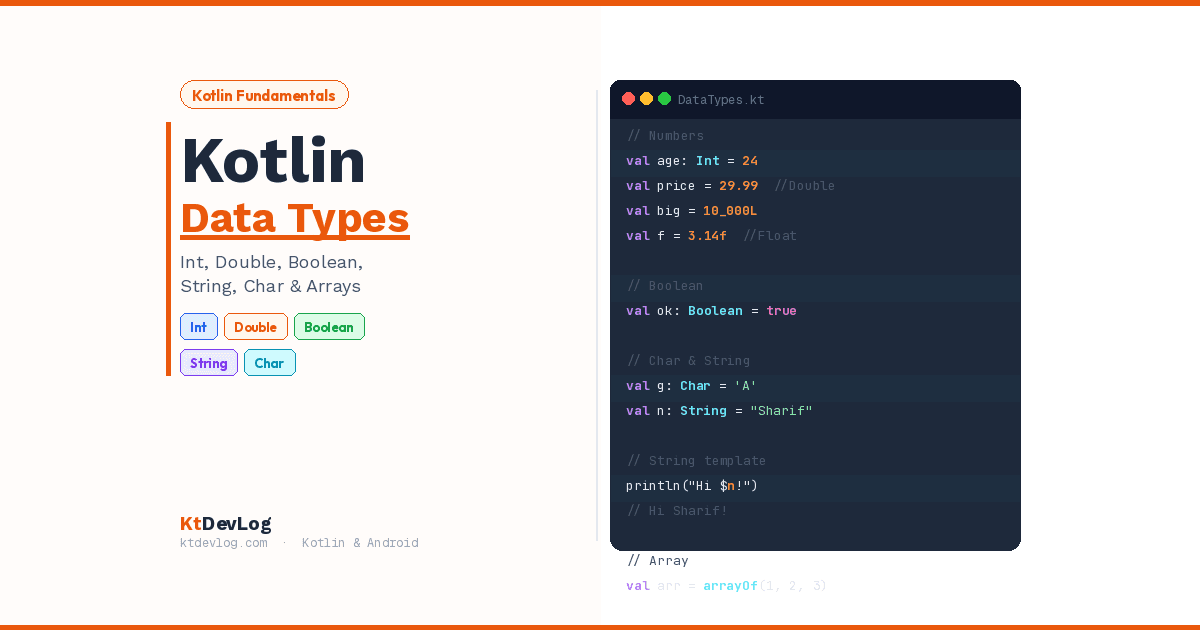

Kotlin data types are the first real concept every beginner needs to get comfortable with — and honestly, they’re one of the most satisfying parts of learning the language.
Here’s why. Every piece of information your app works with — a user’s name, their age, whether they’re logged in, their profile picture URL — is stored in a variable. And every variable needs to know what kind of data it holds. That’s exactly what a data type tells the Kotlin compiler.
Think of data types like containers in a kitchen. A mug holds liquid. A plate holds food. You wouldn’t pour coffee into a plate — the container type matters. In the same way, Kotlin data types tell the compiler what kind of value lives in each variable, how much memory to set aside for it, and what operations are allowed on it.



What makes Kotlin particularly interesting is that it treats everything as an object — including numbers. There are no raw primitive types like in Java. According to the official Kotlin documentation, all basic types in Kotlin are objects, though the compiler optimises them to JVM primitives under the hood for performance. You get the safety of objects with the speed of primitives. Best of both worlds.
Let’s walk through all five essential Kotlin data types with clear examples, real-world context, and everything you need to use them confidently.
Table of Contents
1. Kotlin Number Types — Integers and Decimals
Numbers are the most fundamental Kotlin data type, and they come in two flavours: integers (whole numbers) and floating-point (decimal numbers).
Integer Types
Integer types store whole numbers — no decimals, no fractions. Kotlin gives you four integer types, each holding a different range of values:
| Type | Size | Min Value | Max Value | Example |
|---|---|---|---|---|
Byte | 8 bits | -128 | 127 | val b: Byte = 100 |
Short | 16 bits | -32,768 | 32,767 | val s: Short = 30000 |
Int | 32 bits | -2³¹ | 2³¹ – 1 | val i = 42 |
Long | 64 bits | -2⁶³ | 2⁶³ – 1 | val l = 10L |
In practice, Int is what you’ll use 90% of the time. Kotlin automatically infers it as the default type for whole numbers. Long comes into play when your number is too large for an Int — like timestamps, file sizes, or large IDs.
val inferredInt = 10            // Kotlin infers this as Int
val inferredLong = 10000000000  // Too big for Int — inferred as Long
val explicitLong = 10L // Explicitly Long using 'L' suffixHere’s something important that catches Java developers off guard: Kotlin has no implicit widening conversions. In Java, you can quietly assign an Int to a Long variable and it just works. In Kotlin, you must be explicit:
val myInt: Int = 42
// val myLong: Long = myInt  // ❌ Error — type mismatch

val myLong: Long = myInt.toLong() // ✅ Explicit conversion requiredThis might feel strict at first, but it’s one of the ways Kotlin prevents subtle bugs that are notoriously hard to track down in production code.
Floating-Point Types
Floating-point types store numbers with decimal points. Kotlin follows the IEEE 754 standard and gives you two options:
| Type | Size | Precision | Example |
|---|---|---|---|
Float | 32 bits | ~6–7 decimal digits | val f = 3.14f |
Double | 64 bits | ~15–16 decimal digits | val d = 3.14159 |
Double is the default — if you write a decimal number without any suffix, Kotlin treats it as a Double. To get a Float, you need the f or F suffix:
val price: Double = 29.99       // Default — Double
val rating: Float = 4.5f        // Float — note the 'f' suffix
val pi = 3.14159265358979 // Inferred as DoubleMy recommendation: use Double as your default for decimal values. Only reach for Float when memory is a real concern — for example, when working with large datasets in graphics or sensor processing. For everyday Android work like prices, ratings, and measurements, Double is the right choice.
Useful Number Trick — Underscores for Readability
Here’s a small Kotlin feature most beginner guides skip: you can use underscores inside number literals to make large numbers more readable, without affecting the value at all:
val population = 1_000_000      // Much easier to read than 1000000
val hexColor = 0xFF_EC_D8_B1    // Readable hex value
val creditCardNumber = 1234_5678_9012_3456LThis is purely for human readability — the compiler ignores the underscores completely.
2. Kotlin Boolean Type — True or False
The Boolean Kotlin data type is the simplest one in the language. It holds exactly two possible values: true or false. Nothing else.
val isKotlinFun: Boolean = true
val isFishTasty = false   // Type inference makes this a Boolean automatically

if (isKotlinFun) {
    println("Yes, Kotlin is fun!")
}// Output:
Yes, Kotlin is fun!Booleans are the engine behind every decision your app makes. Every if statement, every when branch, every loop condition — they all rely on a Boolean value. If you’ve already read the guide on Kotlin control flow, you’ve already seen Booleans doing the heavy lifting.
Kotlin supports three logical operators with Booleans:
val a = true
val b = false

println(a && b)   // AND — false (both must be true)
println(a || b)   // OR  — true  (at least one must be true)
println(!a) // NOT — false (inverts the value)// Output:
false
true
falseOne practical detail worth knowing: Kotlin Booleans are non-nullable by default. A Boolean variable can only be true or false — never null. If you ever need a Boolean that might be null (rare, but it happens with API responses), you declare it as Boolean?. We’ll cover nullable types in a future guide.
3. Kotlin Char Type — Single Characters
The Char Kotlin data type represents a single 16-bit Unicode character. Character literals are always enclosed in single quotes — not double quotes, which are for Strings:
val letter: Char = 'K'
val digit = '7'             // Inferred as Char
val emoji = '★'             // Unicode characters work too

// val notAChar = 'KO' // ❌ Error — too many charactersHere’s a critical difference from Java that trips up a lot of developers: in Kotlin, Char is NOT a number. In Java, a char is secretly just an integer under the hood, and you can assign them back and forth. Kotlin deliberately broke this to prevent a whole category of silent bugs:
val c = 'A'
// val i: Int = c            // ❌ Error — Char is not an Int in Kotlin

val code: Int = c.code       // ✅ Use .code to get the Unicode/ASCII value
println(code) // 65// Output:
65The .code property (or .toInt() in older Kotlin versions) gives you the numeric Unicode value. You’d use this for things like checking if a character is a letter, converting between cases, or validating input character by character.
One more useful trick — iterating over a range of characters:
for (ch in 'A'..'E') {
    print("$ch ")
}// Output:
A B C D EThis works because Kotlin’s range operator .. works on Char values as well as numbers.
4. Kotlin String Type — Text and Templates
The String Kotlin data type represents an immutable sequence of characters. String literals are enclosed in double quotes. Once you create a String, its content can’t be changed — you can only create new Strings derived from it.
val greeting: String = "Welcome to KtDevLog!"
val name = "Sharif" // Inferred as StringString Templates — Kotlin’s Superpower
This is one of the first Kotlin features that makes developers coming from Java smile. Instead of concatenating strings with +, Kotlin lets you embed variables and expressions directly inside a string using the $ symbol:
val name = "Sharif"
val age = 24
val site = "KtDevLog"

// Old Java way — messy
println("Hello, " + name + "! You are " + age + " years old.")

// Kotlin string template — clean and readable
println("Hello, $name! You are $age years old.")
println("Welcome to ${site.uppercase()}!")// Output:
Hello, Sharif! You are 24 years old.
Welcome to KTDEVLOG!Use $variable for simple values. Use ${expression} when you need to run a calculation or call a function inside the string. This pattern is everywhere in real Android apps — from building display messages to constructing API URLs.
Multiline Strings
Kotlin also supports raw strings using triple quotes """. These preserve line breaks, indentation, and special characters without any escape sequences:
val message = """
    Welcome to KtDevLog!
    Your Kotlin learning hub.
    Start building Android apps today.
""".trimIndent()

println(message)// Output:
Welcome to KtDevLog!
Your Kotlin learning hub.
Start building Android apps today.The .trimIndent() call removes the leading whitespace from each line so your output looks clean. This is genuinely useful for SQL queries, JSON templates, multi-line error messages, and anywhere you need a block of text without escape characters cluttering it up.
5. Kotlin Array Type — Collections of Values
The Array Kotlin data type lets you store multiple values of the same type in a single variable. Arrays are created using arrayOf(), and each element is accessed by its index — starting from 0.
val numbers = arrayOf(1, 2, 3, 4, 5)         // Inferred as Array<Int>
val names: Array<String> = arrayOf("Sharif", "Mia", "KtDevLog")

println(numbers[0])    // First element
println(names[2])      // Third element
println(numbers.size) // Number of elements// Output:
1
KtDevLog
5Iterating Over an Array
The most common thing you’ll do with an array is loop through it. Kotlin makes this clean with for:
val languages = arrayOf("Kotlin", "Java", "Python")

for (language in languages) {
    println("I know $language")
}// Output:
I know Kotlin
I know Java
I know PythonArrays vs Lists — Which Should You Use?
Here’s the insight most Kotlin data types tutorials skip entirely: in modern Kotlin and Android development, you’ll actually reach for Lists far more often than Arrays.
Here’s why:
Arrayhas a fixed size — once created, you can’t add or remove elementsList(andMutableList) is more flexible, has richer helper functions, and integrates better with Kotlin’s collection APIs like.map(),.filter(), and.find()- Most Android APIs and Jetpack libraries work with
List, notArray
// Array — fixed size, less flexible
val fixedArray = arrayOf(1, 2, 3)

// List — preferred in modern Kotlin
val flexibleList = listOf(1, 2, 3)
val mutableList = mutableListOf(1, 2, 3)
mutableList.add(4) // ✅ Can add elementsUse Array when you’re working with a fixed set of values that never changes in size, or when interacting with Java APIs that expect arrays. For everything else — use List.
Kotlin Type Inference — Let the Compiler Do the Work
One thing you’ve probably noticed throughout this guide: you don’t always need to write the type explicitly. Kotlin’s type inference lets the compiler figure out the type from the value you assign:
val score = 95          // Kotlin infers: Int
val average = 88.5      // Kotlin infers: Double
val passed = true       // Kotlin infers: Boolean
val username = "Sharif" // Kotlin infers: StringThis is perfectly safe and idiomatic Kotlin. The type is still strictly enforced at compile time — you just don’t have to type it out. That said, there are times when being explicit is better:
// Explicit types improve clarity in public APIs and complex code
fun getUserScore(): Int {
    val score: Int = calculateScore()
    return score
}My rule of thumb: let inference do its job in local variables. Be explicit in function signatures, public properties, and anywhere the type isn’t immediately obvious from the value.
Frequently Asked Questions
What are the basic Kotlin data types?
The basic Kotlin data types are Numbers (Int, Long, Float, Double, Byte, Short), Boolean, Char, String, and Array. All of these are objects in Kotlin — there are no raw primitive types like in Java. The Kotlin compiler automatically optimises them to JVM primitives under the hood for performance, so you get object-oriented safety without any speed penalty.
What is the default number type in Kotlin?
For whole numbers, Kotlin’s default is Int. For decimal numbers, the default is Double. This means val x = 42 is an Int, and val y = 3.14 is a Double. To explicitly create a Long, add the L suffix: val big = 10L. To create a Float, add f: val small = 3.14f.
Does Kotlin have type inference?
Yes. Kotlin’s type inference lets the compiler automatically determine a variable’s type from the value assigned to it. You don’t need to write val name: String = "Sharif" — you can just write val name = "Sharif" and Kotlin knows it’s a String. Type inference reduces boilerplate without sacrificing type safety.
What is the difference between Float and Double in Kotlin?
Float is a 32-bit floating-point number with about 6–7 decimal digits of precision. Double is 64-bit with about 15–16 decimal digits. Double is the default for decimal numbers in Kotlin. Use Float only when memory or performance constraints specifically require it — for most Android development, Double is the right choice.
Is Char a number in Kotlin?
No — and this is an important difference from Java. In Kotlin, Char is its own distinct type and cannot be directly assigned to a numeric variable. To get the numeric Unicode value of a Char, use the .code property: val code = 'A'.code gives you 65. This deliberate design choice prevents a class of silent type-conversion bugs common in Java.
Conclusion
Kotlin data types are the foundation everything else builds on. Every variable you declare, every function you write, every Android screen you build — all of it starts with understanding what kind of data you’re working with and which type to use.
Here’s the quick recap: use Int for whole numbers by default, Double for decimals, Boolean for true/false logic, String for text with powerful template support, Char for single characters — and remember it’s not a number. Use Array for fixed-size collections, but prefer List in most real-world scenarios.
One pattern ties all of this together: let Kotlin’s type inference work for you in local variables, but be explicit when clarity matters. The compiler is smart — lean on it.
Now that you understand Kotlin data types, the natural next step is seeing how they work with variables and mutability. Head over to Kotlin variables — val vs var to see exactly how Kotlin stores and protects these types in your code. And when you’re ready to start making decisions with your data, Kotlin control flow — if, else, and when is where it all comes together.
For a deeper look at how data classes use these types to eliminate boilerplate, Kotlin data classes and copy() is the perfect follow-up read.
Every Kotlin app ever built started with a type, a variable, and a value. Now you know exactly what those mean.