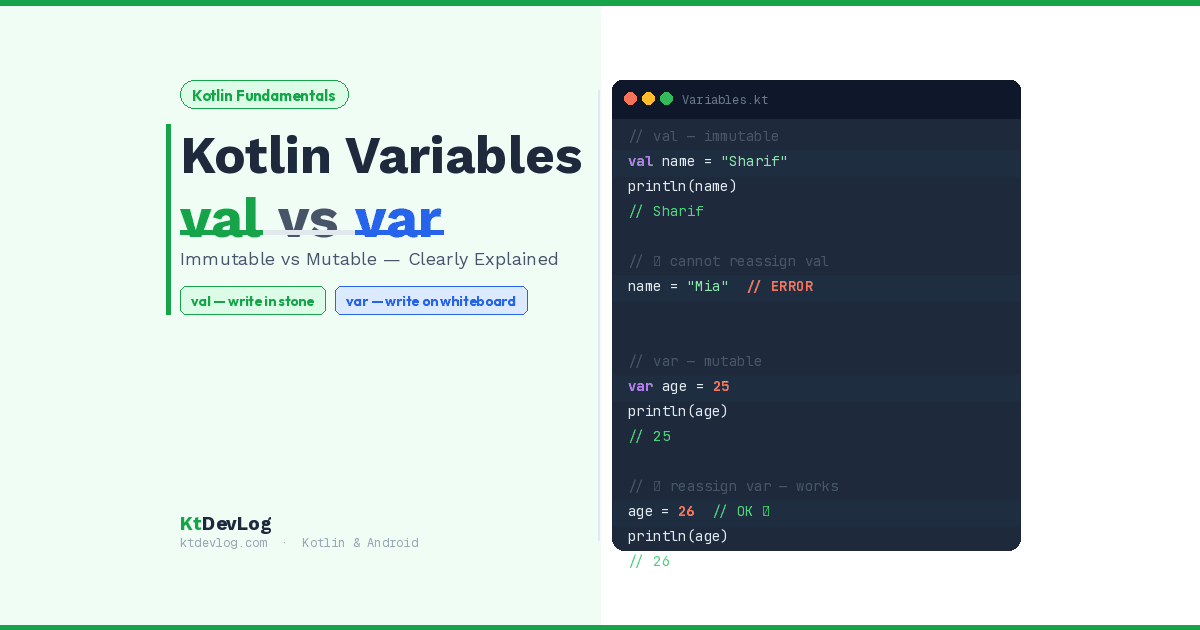

Kotlin variables val vs var — it’s one of the very first decisions you make every single time you write Kotlin code.
And it’s a decision most beginners get wrong at first. Not because it’s complicated, but because nobody explains why it matters. You’ll see val and var everywhere — in tutorials, in Android documentation, in every Kotlin codebase on GitHub — and understanding the difference between them is the foundation everything else builds on.
Here’s your analogy before the code. Sharif has a name. He’s always been Sharif. That’s a val — written in stone, it never changes. But Sharif’s age? That changes every year. That’s a var — written on a whiteboard, easy to erase and update.



Two keywords. One rule. Let’s walk through everything you need to know.
Table of Contents
What Are Variables in Kotlin?
Before we compare val and var, let’s make sure we’re clear on what a variable actually is.
A variable is a named container that holds a value in memory. When you write val name = "Sharif", you’re telling Kotlin: “Create a container, call it name, and put the value "Sharif" inside it.”
According to the official Kotlin documentation, every variable in Kotlin is declared starting with one of two keywords — val or var — followed by the variable name. That choice between val and var tells the compiler something important: whether this container’s contents can ever be replaced.
This is different from Java, where variables are mutable by default and you have to explicitly add final to make something immutable. Kotlin flips this thinking entirely — it encourages you to reach for val first, and only use var when you genuinely need to change the value.
Kotlin val — Immutable Variables
val stands for value. Once you assign a value to a val variable, it’s locked. You cannot reassign it. The Kotlin compiler will throw an error before your code even runs if you try.
val name = "Sharif"
println(name)// Output:
SharifSimple enough. Now watch what happens if you try to change it:
val name = "Sharif"
name = "Mia" // ❌ Error: Val cannot be reassignedThat error isn’t a warning. It’s not a runtime crash. The code won’t compile at all. Kotlin catches this mistake before your program ever runs — which is exactly the point. val is a locked door. You can look through it, but you can’t open it and swap what’s inside.
Think of val like writing in stone. Once Sharif’s name is carved into the stone, you can’t go back and carve “Mia” over it. The stone — and the name — is permanent.
Where You’ll Use val in Real Android Apps
In practice, val is used far more than var in professional Kotlin code. Here’s what that looks like in an Android project:
// App-level constants that never change
val APP_NAME = "KtDevLog"
val MAX_LOGIN_ATTEMPTS = 3
val BASE_URL = "https://api.ktdevlog.com"

// User data that shouldn't be modified after creation
val userId = "usr_001"
val accountCreatedDate = "2024-01-15"

// A list that won't be replaced (contents can change, reference cannot)
val userList = listOf("Sharif", "Mia", "Kotlin")Notice that val doesn’t just apply to simple strings and numbers. When you combine val with Kotlin data classes, you get immutable model objects that can’t be accidentally overwritten — one of the patterns that makes Kotlin code so much safer than equivalent Java.
val Is Not the Same as a Constant
Here’s the detail most beginners miss — and it’s worth understanding clearly.
val makes the reference immutable. If the value it points to is itself a mutable object, the contents of that object can still change. The val just means you can’t point it at a completely different object.
val scores = mutableListOf(10, 20, 30)
scores.add(40)        // ✅ Allowed — modifying the list's contents
// scores = mutableListOf(1, 2) // ❌ Error — can't replace the reference
println(scores)// Output:
[10, 20, 30, 40]The list itself changed — but scores still points to the same list object. The reference is immutable. The object is not. This distinction matters more as you start working with collections and state management.
Kotlin var — Mutable Variables
var stands for variable. A var can be reassigned as many times as you need, at any point in your code.
var age = 25
println(age)

age = 26
println(age)

age = 27
println(age)// Output:
25
26
27No errors. No problems. age updates every time you reassign it, and Kotlin is perfectly happy about it.
Think of var like writing on a whiteboard. “Sharif” is up there today. Tomorrow you erase it and write “Mia”. Next week you write something else entirely. The whiteboard doesn’t resist — it accepts whatever you write.
Where You’ll Use var in Real Android Apps
var shows up in Android development wherever data genuinely needs to change over time:
// A counter that increases
var loginAttempts = 0
loginAttempts++   // Now 1
loginAttempts++   // Now 2

// A score that updates during a game
var playerScore = 0
playerScore += 100
playerScore += 250
println("Score: $playerScore")  // Score: 350

// User input that changes as they type
var searchQuery = ""
searchQuery = "Kotlin"
searchQuery = "Kotlin val"
// Output:
Score: 350You’ll also see var used heavily inside ViewModels when managing UI state that changes in response to user actions — though in modern Android development, this is increasingly handled through Kotlin StateFlow, which wraps mutable state in a cleaner, observable pattern.
val vs var — The 3 Key Differences
Now that you’ve seen both in action, here’s the clear side-by-side comparison:
Difference 1 — Reassignment
// val — reassignment not allowed
val name = "Sharif"
// name = "Mia"  ❌ Error: Val cannot be reassigned

// var — reassignment allowed
var age = 25
age = 26 // ✅ Works perfectlyThis is the most obvious difference. val locks the reference. var keeps it open.
Difference 2 — Intent and Safety
// val communicates: "This value should never change"
val apiKey = "abc123xyz"

// var communicates: "This value will change over time"
var retryCount = 0When another developer reads your code and sees val, they immediately know: don’t try to change this, it’s not meant to change. When they see var, they know: this value is expected to evolve. Your variable keyword is documentation — it tells the story of your data’s lifecycle.
Difference 3 — Compiler Protection
val maxRetries = 3

fun attemptLogin() {
    // maxRetries = 5  ❌ Caught by compiler — won't even build
    // This protects you from accidental modifications anywhere in the codebase
}With val, the Kotlin compiler actively protects you. It’s not just a convention — it’s enforced. In a large Android app with dozens of files and multiple developers, this compiler enforcement prevents entire categories of bugs that would otherwise be silent and hard to trace.
The Golden Rule — val First, var Only When Necessary
Here’s the professional Kotlin developer’s default mindset, recommended by Android’s official developer documentation:
Use
valby default. Only switch tovarwhen you genuinely need to reassign the value.
In practice, this means asking yourself one question before every variable: “Will this value ever need to change?” If the answer is no — use val. If the answer is yes — use var.
// ✅ Good — val for things that don't change
val userName = "Sharif"
val screenWidth = 1080
val isFeatureEnabled = true

// ✅ Good — var for things that do change
var currentPage = 1
var isLoading = false
var errorMessage = ""Why does this matter beyond safety? Code with more val variables is easier to reason about. When you see a val, you know it has exactly one value for its entire lifetime. You don’t need to trace through the code wondering where it might have changed. That simplicity adds up enormously in larger projects.
Bonus — const val for Compile-Time Constants
Once you’re comfortable with val and var, there’s one more keyword worth knowing: const val.
While regular val is read-only at runtime, const val is resolved at compile time. This makes it slightly more efficient and is the right choice for truly fixed constants that will never change under any circumstances:
// At the top of a file or inside an object
const val APP_VERSION = "1.0.0"
const val MAX_ITEMS_PER_PAGE = 20
const val BASE_URL = "https://ktdevlog.com"A few rules for const val:
- It can only hold primitive types and
String - It must be declared at the top level or inside an
object - Its value must be known at compile time — no function calls, no runtime values
Think of const val as the ultimate val — not just locked at runtime, but baked directly into the compiled code. For API keys, app constants, and configuration values that are truly fixed, const val is the cleanest choice.
val and var With Type Inference
One thing you’ve probably noticed in all these examples: we haven’t always written the type explicitly. That’s Kotlin’s type inference at work — the compiler figures out the type from the value you assign.
Both val and var support type inference:
val name = "Sharif"    // Kotlin infers: String
var age = 25           // Kotlin infers: Int
val price = 29.99      // Kotlin infers: Double
var isLoggedIn = false // Kotlin infers: BooleanYou can also be explicit when clarity helps:
val name: String = "Sharif"
var age: Int = 25Both styles are valid. Let inference do the work in straightforward local variables. Be explicit in function signatures and public APIs where the type might not be immediately obvious. For more on Kotlin’s type system, the guide on Kotlin data types covers everything you need to know about what types are available and when to use each one.
Frequently Asked Questions
What is the difference between val and var in Kotlin?
val declares an immutable (read-only) variable — once assigned, its value cannot be reassigned. var declares a mutable variable — its value can be changed as many times as needed. Both support type inference. The key rule is to use val by default and only use var when you genuinely need to reassign the variable.
Can a val variable change in Kotlin?
The reference itself cannot be reassigned, but if a val points to a mutable object (like a MutableList), the contents of that object can still change. What val guarantees is that you can’t point the variable at a completely different object after it’s been assigned. For truly constant values, use const val.
Should I use val or var in Kotlin?
Use val by default — this is the recommendation from both the official Kotlin documentation and Android’s developer guides. Only use var when the value genuinely needs to change over time. In most real Android apps, the majority of variables are val. Using val where possible makes code safer, easier to read, and prevents a whole class of accidental reassignment bugs.
What is const val in Kotlin?
const val is a compile-time constant. Unlike regular val, which is read-only at runtime, const val is resolved at compile time and inlined into the bytecode. It can only hold primitive types and String, and must be declared at the top level or inside an object. Use it for truly fixed values like API base URLs, app version strings, and configuration constants.
Is Kotlin val the same as Java final?
They’re very similar. val in Kotlin behaves like final in Java — both make a variable’s reference immutable after assignment. The key difference is that in Java, final is something you add explicitly to prevent mutation. In Kotlin, val is the default choice the language encourages, making immutability the easier path rather than the extra effort.
Conclusion
Kotlin variables val vs var is one of those concepts that seems tiny at first — just two three-letter keywords — but it shapes the quality of every piece of Kotlin code you’ll ever write.
val is your default. Written in stone. Immutable, safe, and self-documenting. It tells anyone reading your code exactly what to expect: this value doesn’t change.
var is your escape hatch. Written on a whiteboard. Flexible, mutable, and necessary — but only when the data genuinely needs to evolve.
Start every variable as val. If the compiler complains because you need to reassign it, change it to var. That’s the whole decision tree — and it’s exactly how professional Kotlin developers think about it every single day.
Once this clicks, every other concept in Kotlin gets easier. Variables feed into Kotlin data types, which feed into Kotlin control flow, which feed into Kotlin data classes. You’ve just built a solid piece of that foundation.
The best Kotlin code isn’t the code that does the most — it’s the code that changes the least.