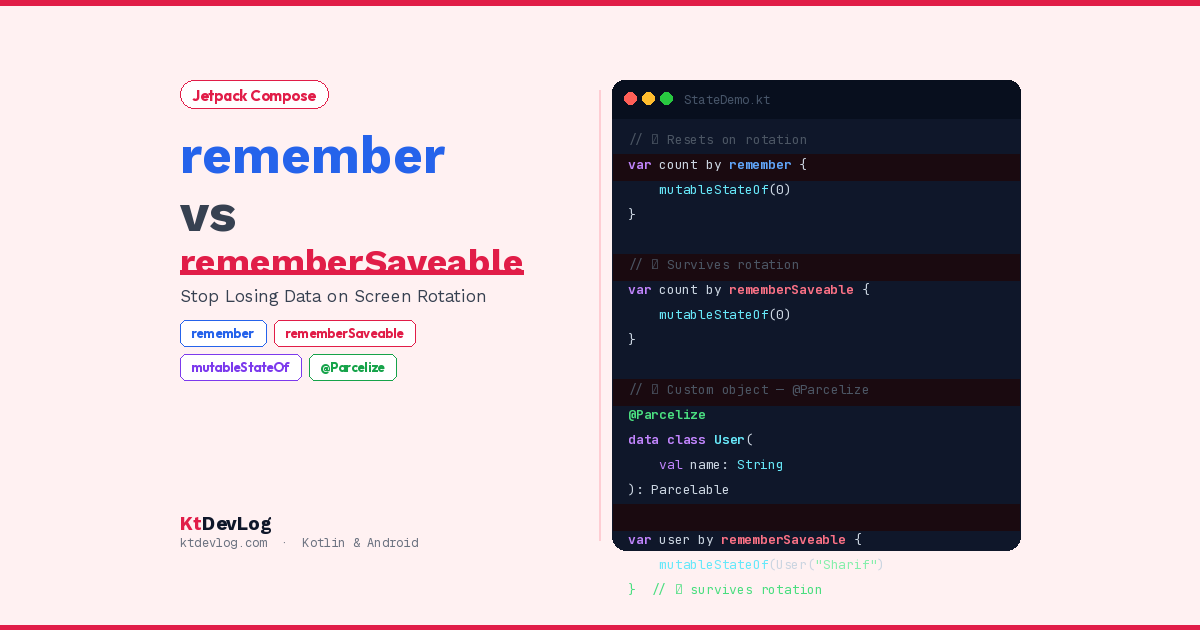

You’ve built a form. The user carefully types their email address, their name, their message. Then they rotate their phone. And everything is gone.
Sound familiar? This exact scenario is one of the most frustrating experiences in Android app development — and it’s almost always caused by not knowing when to use remember vs rememberSaveable in Jetpack Compose.
Here’s the thing: both functions store state in your composables. But they have completely different lifespans. Understanding that difference — and knowing which one to reach for in which situation — is one of the most important skills in modern Android development.

This guide explains remember vs rememberSaveable Compose clearly, shows you exactly what happens to your state during recomposition, rotation, and process death, introduces the new rememberSerializable API added in 2026, and gives you a simple decision framework you’ll use in every Compose screen you build.
Table of Contents
What Is State in Jetpack Compose?
Before comparing the two functions, it’s worth making sure we understand what “state” means in Compose — because this is where beginners often get confused.
In Jetpack Compose, your UI is a function of your state. When state changes, Compose re-executes the relevant composable functions and updates the screen. This process is called recomposition.
The problem? Every time a composable recomposes, local variables get reset to their initial values. Without a way to preserve state across recompositions, your counter would reset to zero, your text field would go blank, and your toggle would flip back — just from a normal UI update.
// ❌ This NEVER works — value resets every recomposition
@Composable
fun BrokenCounter() {
    var count = 0  // Resets to 0 on every recomposition

    Button(onClick = { count++ }) {
        Text("Count: $count")  // Always shows 0
    }
}The button click triggers recomposition. Recomposition re-runs the function. count resets to 0. The user sees nothing change. This is why state management exists in Compose — and why remember was introduced.
What Is remember in Jetpack Compose?
remember stores a value in the composition and keeps it alive across recompositions. The value survives as long as the composable stays in the composition — meaning as long as the screen is visible and the composable isn’t removed from the UI tree.
@Composable
fun WorkingCounter() {
    var count by remember { mutableStateOf(0) }

    Column(
        modifier = Modifier.fillMaxSize(),
        verticalArrangement = Arrangement.Center,
        horizontalAlignment = Alignment.CenterHorizontally
    ) {
        Text(
            text = "Count: $count",
            fontSize = 32.sp,
            fontWeight = FontWeight.Bold
        )
        Spacer(modifier = Modifier.height(16.dp))
        Button(onClick = { count++ }) {
            Text("Increment")
        }
    }
}Now when the button is tapped, count increments correctly. Recomposition runs, but remember returns the same count value rather than letting it reset. The UI updates. Everything works.
What remember Survives and What It Doesn’t
This is the critical detail. According to the official Jetpack Compose state documentation, remember retains state across recompositions — but not across configuration changes.
| Event | remember survives? |
|---|---|
| Button tap → recomposition | ✅ Yes |
| State update → recomposition | ✅ Yes |
| Composable temporarily removed | ❌ No — resets |
| Screen rotation | ❌ No — resets |
| App goes to background | ❌ No — may reset |
| Process death | ❌ No — resets |
Screen rotation is the most common configuration change your users will trigger. When the device rotates, Android recreates the Activity. The entire composition is destroyed and rebuilt from scratch. Every remember value is lost.
// count survives taps but RESETS on rotation ❌
var count by remember { mutableStateOf(0) }What Is rememberSaveable in Jetpack Compose?
rememberSaveable is remember with one critical superpower — it survives configuration changes by saving its value into Android’s Bundle mechanism. The same savedInstanceState that saved Activity state in the XML world now saves your Compose state.
@Composable
fun RotationProofCounter() {
    // count survives rotation ✅
    var count by rememberSaveable { mutableStateOf(0) }

    Column(
        modifier = Modifier.fillMaxSize(),
        verticalArrangement = Arrangement.Center,
        horizontalAlignment = Alignment.CenterHorizontally
    ) {
        Text(
            text = "Count: $count",
            fontSize = 32.sp,
            fontWeight = FontWeight.Bold
        )
        Spacer(modifier = Modifier.height(16.dp))
        Button(onClick = { count++ }) {
            Text("Increment")
        }
    }
}One word changed — remember to rememberSaveable. Now count survives screen rotation, language changes, dark mode switches, and any other configuration change Android triggers.
What rememberSaveable Survives
| Event | rememberSaveable survives? |
|---|---|
| Recomposition | ✅ Yes |
| Screen rotation | ✅ Yes |
| Language/font size change | ✅ Yes |
| System dark mode toggle | ✅ Yes |
| App goes to background | ✅ Yes (system-initiated) |
| Process death (system kills app) | ✅ Yes |
| User swipes app away from recents | ❌ No |
That last point is important and worth highlighting. rememberSaveable does not preserve state if the user explicitly dismisses the app — swiping it away from the recents screen. That’s intentional. The user chose to close the app. Restoring state after that would feel wrong.
The Real-World Example — A Login Form
Let me show you exactly why this matters in a form that real users will interact with. This is the scenario from the introduction — but now you’ll see exactly what’s happening and why:
// ❌ With remember — form resets on rotation
@Composable
fun LoginFormWithRemember() {
    var email by remember { mutableStateOf("") }
    var password by remember { mutableStateOf("") }

    Column(
        modifier = Modifier
            .fillMaxSize()
            .padding(24.dp),
        verticalArrangement = Arrangement.Center
    ) {
        OutlinedTextField(
            value = email,
            onValueChange = { email = it },
            label = { Text("Email") },
            modifier = Modifier.fillMaxWidth()
        )
        Spacer(modifier = Modifier.height(12.dp))
        OutlinedTextField(
            value = password,
            onValueChange = { password = it },
            label = { Text("Password") },
            visualTransformation = PasswordVisualTransformation(),
            modifier = Modifier.fillMaxWidth()
        )
        Spacer(modifier = Modifier.height(24.dp))
        Button(
            onClick = { /* login */ },
            modifier = Modifier.fillMaxWidth()
        ) {
            Text("Log In")
        }
    }
}User types their email. User types their password. User rotates phone. Both fields are blank. The user is frustrated.
// ✅ With rememberSaveable — form survives rotation
@Composable
fun LoginFormWithRememberSaveable() {
    var email by rememberSaveable { mutableStateOf("") }
    var password by rememberSaveable { mutableStateOf("") }

    // Rest of the UI is identical...
}Two words changed. Now rotation is invisible to the user. Their email and password are exactly where they left them.
What Types Can rememberSaveable Store?
Here’s where developers hit a wall — rememberSaveable doesn’t work with every data type. It saves values into a Bundle, which has strict type requirements.
Works automatically with:
Int,Long,Float,Double,BooleanStringParcelableobjects- Arrays of the above types
Doesn’t work automatically with:
- Custom data classes (unless made
Parcelable) List<T>of complex objects- Any non-Bundle-compatible type
Saving Custom Objects With @Parcelize
The cleanest solution for custom data classes is the @Parcelize annotation from the kotlin-parcelize plugin:
// Add plugin to build.gradle.kts
plugins {
    id("kotlin-parcelize")
}@Parcelize
data class UserProfile(
val name: String,
val email: String,
val age: Int
) : Parcelable
@Composable
fun ProfileScreen() {
var profile by rememberSaveable {
mutableStateOf(UserProfile("Sharif", "sharif@ktdevlog.com", 24))
}
// profile survives rotation ✅
Text("Name: ${profile.name}")
}@Parcelize automatically generates all the serialization code needed to put your object into a Bundle. One annotation. Done.
Custom Saver for Complex Types
For cases where @Parcelize isn’t practical — third-party classes you can’t modify, objects with non-Parcelable fields — you can write a custom Saver:
data class SearchState(
    val query: String,
    val filterActive: Boolean,
    val resultCount: Int
)

val SearchStateSaver = run {
    val queryKey = "query"
    val filterKey = "filterActive"
    val countKey  = "resultCount"

    mapSaver(
        save = { state ->
            mapOf(
                queryKey to state.query,
                filterKey to state.filterActive,
                countKey  to state.resultCount
            )
        },
        restore = { map ->
            SearchState(
                query       = map[queryKey] as String,
                filterActive = map[filterKey] as Boolean,
                resultCount  = map[countKey] as Int
            )
        }
    )
}

@Composable
fun SearchScreen() {
    var searchState by rememberSaveable(stateSaver = SearchStateSaver) {
        mutableStateOf(SearchState("", false, 0))
    }

    // searchState survives rotation ✅
}The mapSaver breaks your object down into a map of primitive types — all Bundle-compatible — for saving, then reconstructs it on restore.
New in 2026 — rememberSerializable
Here’s something most guides currently don’t mention at all. As of 2026, the official Android documentation introduced a fourth state API: rememberSerializable.
According to the official state lifespans documentation, rememberSerializable works like rememberSaveable but uses kotlinx.serialization under the hood instead of Android’s Bundle mechanism.
// Add to build.gradle.kts
implementation("org.jetbrains.kotlinx:kotlinx-serialization-json:1.7.0")@Serializable
data class FilterState(
val query: String = "",
val sortOrder: String = "newest",
val category: String = "all"
)
@Composable
fun FilterScreen() {
var filterState by rememberSerializable {
mutableStateOf(FilterState())
}
// Survives rotation AND process death
// No @Parcelize needed — just @Serializable
}The advantage over rememberSaveable with custom savers: @Serializable is simpler to add than @Parcelize for complex nested types, and kotlinx.serialization integrates cleanly with modern Kotlin-first codebases that already use it for API response parsing.
For most projects in 2026, use rememberSaveable with @Parcelize for simple custom types and rememberSerializable for complex nested objects where kotlinx.serialization is already a dependency.
When to Use Which — The Full Decision Guide
Here’s the honest framework you should follow every time you add state to a composable:
Use remember when:
- The state only matters while the screen is visible
- Losing the value on rotation is acceptable or expected
- You’re storing expensive computed values to avoid recalculation on recomposition
- Animation state, scroll position offsets, temporary UI toggles
// ✅ remember — dialog open state, resets on rotation intentionally
var isDialogOpen by remember { mutableStateOf(false) }

// ✅ remember — scroll state (screen position not worth restoring)
val listState = rememberLazyListState()

// ✅ remember — computed/cached value
val sortedItems = remember(items) { items.sortedBy { it.title } }Use rememberSaveable when:
- The user typed or selected something that losing would frustrate them
- The state represents user input or preferences
- You want consistent UX across rotation and background/foreground cycles
// ✅ rememberSaveable — text field input
var searchQuery by rememberSaveable { mutableStateOf("") }

// ✅ rememberSaveable — tab selection
var selectedTab by rememberSaveable { mutableStateOf(0) }

// ✅ rememberSaveable — form fields
var email by rememberSaveable { mutableStateOf("") }Use ViewModel instead when:
- The state is shared between multiple composables or screens
- The state involves async operations — API calls, database queries
- The business logic for managing state belongs outside the UI layer
This last point connects directly to the architecture pattern covered in Kotlin StateFlow and SharedFlow — for complex screen state that involves network calls and multiple UI interactions, the ViewModel + StateFlow pattern is the correct home for that state, not rememberSaveable.
The Complete State Lifespan Comparison
Here’s the full picture including the new 2026 APIs, directly from the official documentation:
| API | Survives recomposition | Survives rotation | Survives process death | Best for |
|---|---|---|---|---|
remember | ✅ | ❌ | ❌ | Temporary UI state |
rememberSaveable | ✅ | ✅ | ✅ | User input, preferences |
rememberSerializable | ✅ | ✅ | ✅ | Complex serializable objects |
ViewModel | ✅ | ✅ | ✅ (with SavedStateHandle) | Business logic + screen state |
Common Mistakes to Avoid
❌ Using remember for user-typed input
// ❌ Text disappears on rotation
var name by remember { mutableStateOf("") }
TextField(value = name, onValueChange = { name = it })

// ✅ Text survives rotation
var name by rememberSaveable { mutableStateOf("") }
TextField(value = name, onValueChange = { name = it })❌ Using rememberSaveable for everything
// ❌ Unnecessary — isExpanded doesn't need to survive rotation
var isExpanded by rememberSaveable { mutableStateOf(false) }

// ✅ Correct — temporary toggle
var isExpanded by remember { mutableStateOf(false) }rememberSaveable writes to the Bundle on every state change. Using it for everything adds unnecessary serialization overhead. Use remember for state where losing the value on rotation is fine.
❌ Storing mutable lists directly
// ❌ Wrong — mutable list changes aren't observed by Compose
var items by remember { mutableStateOf(mutableListOf("A", "B")) }

// ✅ Correct — use immutable list, replace on change
var items by remember { mutableStateOf(listOf("A", "B")) }
items = items + "C" // Creates new list — Compose detects the changeThis applies to both remember and rememberSaveable. The Kotlin null safety patterns you already know — preferring immutability — apply here too. Mutable objects that aren’t observable won’t trigger recomposition even when their contents change.
Frequently Asked Questions
What is the difference between remember and rememberSaveable in Jetpack Compose?
remember stores state across recompositions but loses it on configuration changes like screen rotation. rememberSaveable stores state across recompositions AND configuration changes by saving it into Android’s Bundle mechanism. Use remember for temporary UI state where losing the value on rotation is acceptable. Use rememberSaveable for any user input or important UI state that should survive rotation.
Why does my Compose state reset on screen rotation?
Screen rotation triggers a configuration change, which causes Android to recreate the Activity. Any state stored with remember is lost during this recreation. To fix it, replace remember with rememberSaveable — your state will then be serialized into Android’s saved instance state Bundle and restored automatically after rotation.
Can rememberSaveable store any data type?
No. rememberSaveable automatically handles primitive types (Int, Long, Float, Double, Boolean), String, and arrays of these types. For custom data classes, add the @Parcelize annotation from the kotlin-parcelize plugin. For complex types, write a custom Saver using mapSaver or listSaver. Alternatively, use the new rememberSerializable API with @Serializable objects.
What is rememberSerializable in Jetpack Compose?
rememberSerializable is a new state API introduced in 2026 that works like rememberSaveable but uses kotlinx.serialization instead of Android’s Bundle mechanism for serializing state. It’s ideal for complex nested data classes that already use @Serializable for API response parsing. Mark your class with @Serializable and use rememberSerializable — no custom Saver needed.
Should I use rememberSaveable or ViewModel for state management?
For simple UI state that belongs to a single composable — text field input, selected tab, toggle state — rememberSaveable is appropriate and much simpler. For state that’s shared across multiple screens, involves async operations like API calls, or contains business logic — use a ViewModel with StateFlow. A good rule: if the state would make sense in a ViewModel, put it there. If it’s purely a UI concern, rememberSaveable is fine.
Conclusion
remember vs rememberSaveable Compose comes down to one question: does this state need to survive screen rotation?
If the answer is no — remember is the right choice. It’s lighter, simpler, and perfectly suited for temporary UI state that the user won’t miss if it resets.
If the answer is yes — reach for rememberSaveable. One word change. Zero extra setup for primitive types and Strings. And for custom objects, @Parcelize or the new rememberSerializable makes it almost as simple.
The mental model is simple: user typed something → rememberSaveable. Temporary UI toggle → remember. Complex screen state with business logic → ViewModel with StateFlow.
Start with your next text field or tab selector. Change remember to rememberSaveable. Rotate your emulator. Watch your data stay exactly where the user left it. That’s the entire lesson — and once you’ve felt the difference, you’ll never guess again.
For the bigger picture of state management in Android, explore how Kotlin StateFlow and SharedFlow handle reactive screen state in ViewModels, how Kotlin sealed classes model the different states your screen can be in, and how Jetpack Compose LazyColumn uses rememberLazyListState() — a remember value — to track and control scroll position.
One word separates a form that frustrates users from one they never notice. That word is Saveable.